How to Personalize Ad Creative at Scale Without Losing Control
You can produce personalized ad variations fast without losing brand control by locking Brand DNA and non-negotiable product facts first, then running one-variable batches where only the hook changes across 10 to 20 versions.
Here’s the minimum viable system that scales past 50 variations without losing control:
- Lock fonts, colors, tone, and product facts before you generate a single scene.
- Treat personalization as message changes, not brand changes or random visual swaps.
- Earn new versions only for audience cuts that truly need different objections answered.
- Build every ad on the same creative anatomy: hook, product moment, proof element, CTA.
- Run hook-only batches so you can attribute lifts to one change, not a mix.
- Use a fixed 48 to 72 hour readout window to decide kill, iterate, or scale.
We built Advertisable AI for this exact bottleneck: teams shipping weekly Meta and TikTok variations that keep drifting off-brand or inventing product details. Our Brand DNA Module pulls guardrails from your product URL, our Storyboard Editor keeps the anatomy consistent, and our Scene Regenerator lets you fix the weakest scene without rebuilding the whole video.
The control point most teams miss is simple: you scale relevance by personalising the message, not the brand, and you do it by holding your core identity constant while you test a single angle at a time.
Scale relevance by personalising the message, not the brand
Scaling personalization is a control problem, not a volume problem. You need many audience-specific versions, but only the message should change; brand presentation and product facts stay fixed so outputs remain accurate and comparable.
What scaling should look like
Real scaling means you can ship 50 to 100 usable variants per week without re-litigating basics like tone, claims, or product details. The goal is relevance by angle, not random variation.
You keep the same product and the same non-negotiable facts, then express it through many angles: different pains, outcomes, objections, or use contexts. That gives you range without turning every version into a new brand.
Each batch needs attributable learning. If you cannot point to exactly one intentional change and read performance in a 48 to 72 hour window, you do not have a test; you have noise.
- Weekly output expectation: a repeatable cadence (for example, 10 to 20 variants per batch, multiple batches per week) that matches your media spend and creative fatigue
- Same product, many angles: lock the product moment and core proof, rotate only the audience frame and hook language
- Attributable learning: define one objective metric per batch (thumb stop, CTR, or CVR) and one variable you are changing
- Platform-ready exports: every variant leaves production with correct aspect ratios and placements for Meta and TikTok so you are not “finishing” assets manually
The two failure modes
Most scaled personalization fails in two predictable ways: the brand drifts, or the creative invents details. Both happen when you let every variant rewrite the rules instead of only moving the message.
Failure mode one is brand drift across variants. Fonts, colors, pacing, voice, and even CTA language start to diverge, so you are no longer testing audience relevance; you are testing different brands in parallel.
Failure mode two is invented claims and details. Variants “helpfully” add pricing, specs, results, or guarantees that are not in your approved product facts, triggering refunds, claim problems, or ad rejections.
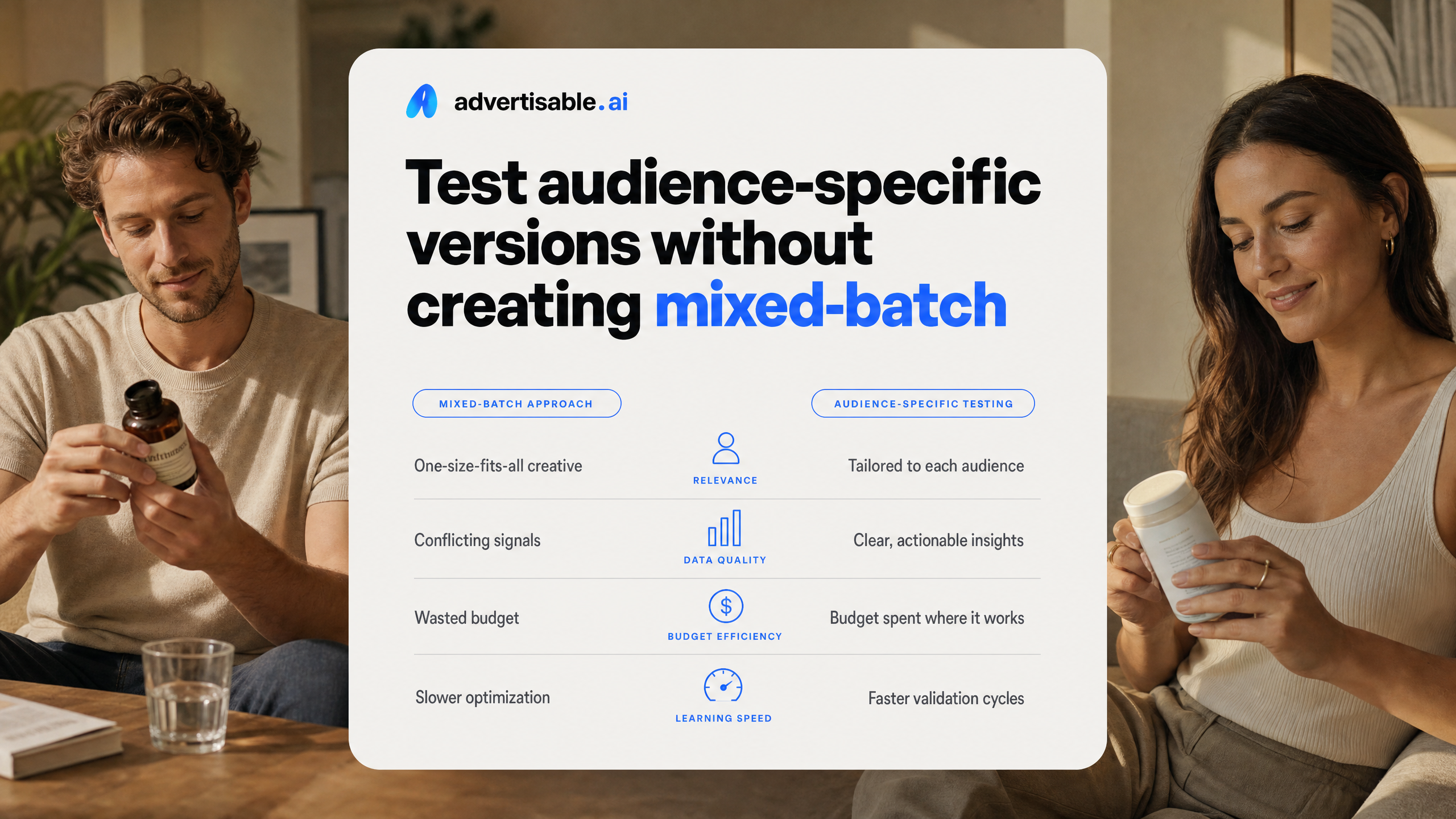
A mixed-batch test makes this worse. When hook, proof element, and CTA all change at once, you cannot attribute lift or loss to any single decision, and your next iteration is guesswork.
- Brand drift consequence: inconsistent on-platform identity that lowers trust and makes winners hard to scale
- Invented details consequence: accuracy risk that increases rejections and post-click disappointment
- Mixed-batch noise consequence: unreadable test results, because you changed multiple variables in one spend window
- Operational outcome: wasted spend on variants you cannot learn from, plus time lost rebuilding creatives that should have been scene-level edits
Define creative personalisation so you do not confuse it with targeting
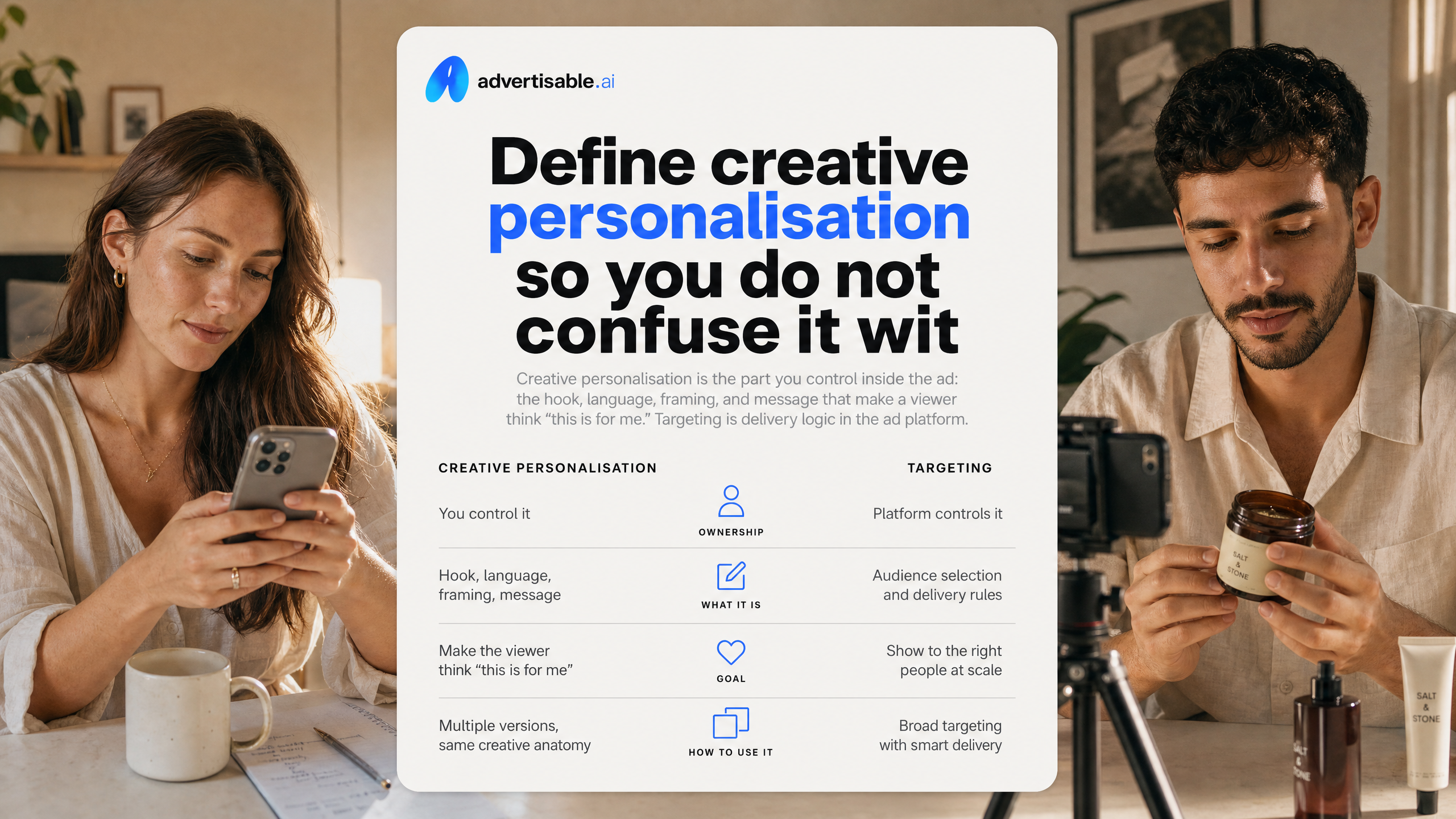
Creative personalisation is the part you control inside the ad: the hook, language, framing, and message that make a viewer think “this is for me.” Targeting is delivery logic in the ad platform. You can run broad targeting and still personalise creatively by shipping multiple audience versions that share the same creative anatomy.
What changes between audience versions
Between audience versions, you change the message, not the product. Think 10 to 20 variants where you keep the structure stable, but adjust what the first two seconds promise and how the story positions the value.
Acceptance criteria: you should be able to point to one clear difference per version and explain it in one sentence. If you cannot, you built a mixed batch and your 48 to 72 hour readout will not be attributable.
- Hook promise and language: swap the exact outcome statement and the words your segment uses (operator terms vs. customer terms), while keeping it concrete
- Problem framing and stakes: same category problem, different consequence (time loss, risk, wasted spend, team bottleneck)
- Use-case emphasis: prioritize one job-to-be-done (launching weekly, scaling a winner, fixing rejections) and show that use-case in the first scenes
- Objection addressed upfront: pick one likely blocker per segment (accuracy, creative fatigue, production time) and neutralize it early
What must stay constant
To avoid drifting into misleading creative, your non-negotiables stay fixed across every audience version. This is how you personalise without inventing claims or breaking your measurement.
We treat these as QA checks before export: if any item changes without intent, the variation fails review.
- Product facts and capabilities: same features, limitations, and concrete claims every time (locked in your Brand DNA Module where possible)
- Offer and CTA consistency: do not rotate discounts or CTAs inside the same test window; keep the ask identical so results map to messaging
- Visual identity and tone: fonts, colors, pacing, and voice stay within guardrails so versions still read as one brand
- Core proof element: keep one proof asset stable (demo clip, testimonial line, before-after, or metric you can support) so trust is comparable across versions
Pick audience cuts that earn their own creative version
Segmentation only helps when it changes the hook and framing enough that you would actually write a different opening. Otherwise you are just multiplying assets without improving clarity or learnings.
The four cuts worth making
The minimum viable approach is to pick audience distinctions that force different promises, proof, or language. In practice, we see four cuts that consistently justify their own creative version because they change what the viewer needs to hear in the first 2 seconds.
- Customer stage differences: cold prospecting vs retargeting vs existing customers. Your hook shifts from “what it is” to “why now” to “how to get more out of what you already bought.”
- Pain point clusters: group by the job-to-be-done, not demographics (for example: speed, cost control, quality control). Each cluster needs a different outcome-led promise.
- Use-case contexts: where and when the product is used (launch week, evergreen scaling, agency multi-client production).
Context changes the framing and the examples that feel credible.
Key objection groups: pick the one “deal-breaker” belief (accuracy risk, brand drift, time to ship, creative fatigue). The proof element and wording must directly neutralize it.
How many versions is sensible
A sensible range is 10 to 20 hook variants per batch, with one audience cut held constant. That volume is enough to see signal without turning QA and reporting into a mess.
Keep the rest of the creative anatomy stable (product moment, proof element, CTA) so you are not running a mixed batch. Mixed batches create combinatorics: 3 stages x 3 pain points x 3 contexts x 3 objections is 81 versions before you have even touched hook wording.
Define a learning goal before you generate anything, and write it like an acceptance criterion: “Which hook type improves thumb stop without lowering CTR?” or “Does the ‘accuracy’ objection framing lift CVR in retargeting?” In our workflow, you read performance in a fixed 48 to 72 hour window, then use the Scene Regenerator to swap only the losing hook scene while holding everything else constant.
Lock Brand DNA and product facts before generating anything
Creative volume fails when your inputs are fuzzy. Start by importing the product URL so the system pulls the exact name, description, on-page claims, and pricing that your ads must stay consistent with.
Then set guardrails before you generate 50 to 100 variants. You want fewer degrees of freedom, not more: locked facts plus locked brand rules, so your only “creative” differences are intentional and reviewable.
Non negotiable product facts checklist
Your fastest path to inaccurate ads is letting copy drift while you scale variants. We treat product facts as a checklist you can QA in under 2 minutes per batch, before any hooks get generated.
In practice, we load these into Advertisable AI via the Brand DNA Module using the product link, then we confirm the facts are present and complete before we produce volume. This is how you keep 20 variations from turning into 20 different “products.”
- What it is and does: the plain-language definition (category + primary job) and the 1 to 3 supported outcomes you can repeat across every ad
- What it cannot claim: excluded outcomes, prohibited comparisons, and anything not explicitly supported on the product page or in approved internal docs
- Required disclaimers language: the exact sentence(s) that must appear when you reference sensitive results, limitations, eligibility, availability, or regulated attributes
- Pricing and bundle rules: current price, sale logic, bundle naming, what “from” pricing means, and which promos cannot be stacked
Brand DNA as the anchor
Brand consistency is not a vibe check. It is a set of constraints you can enforce so every audience-specific variant still looks and sounds like one company, even when you produce 100+ ads.
We document Brand DNA as rules the team can check: what stays constant across all variants, and what is allowed to change (typically the hook and opening visual). The objective is simple: viewers should recognize you within the first 2 seconds, even when the message angle shifts.
In Advertisable AI, the Brand DNA Module and Storyboard Editor work together to keep the anatomy stable while you vary only what you intended. That reduces off-brand rewrites and prevents “creative” from inventing new claims.
- Tone and voice rules: sentence length, vocabulary you do and do not use, and how assertive you are allowed to be
- Visual identity constraints: locked colors, font behavior, logo placement safe zones, and do-not-use imagery categories
- Claim boundaries and phrasing: approved verbs (for example “helps” vs “cures”), proof requirements, and banned absolutes
- Consistency across variants: one master CTA, one product naming convention, and a single set of proof elements reused across the batch
Run the controlled workflow: one audience angle, hook-only batches
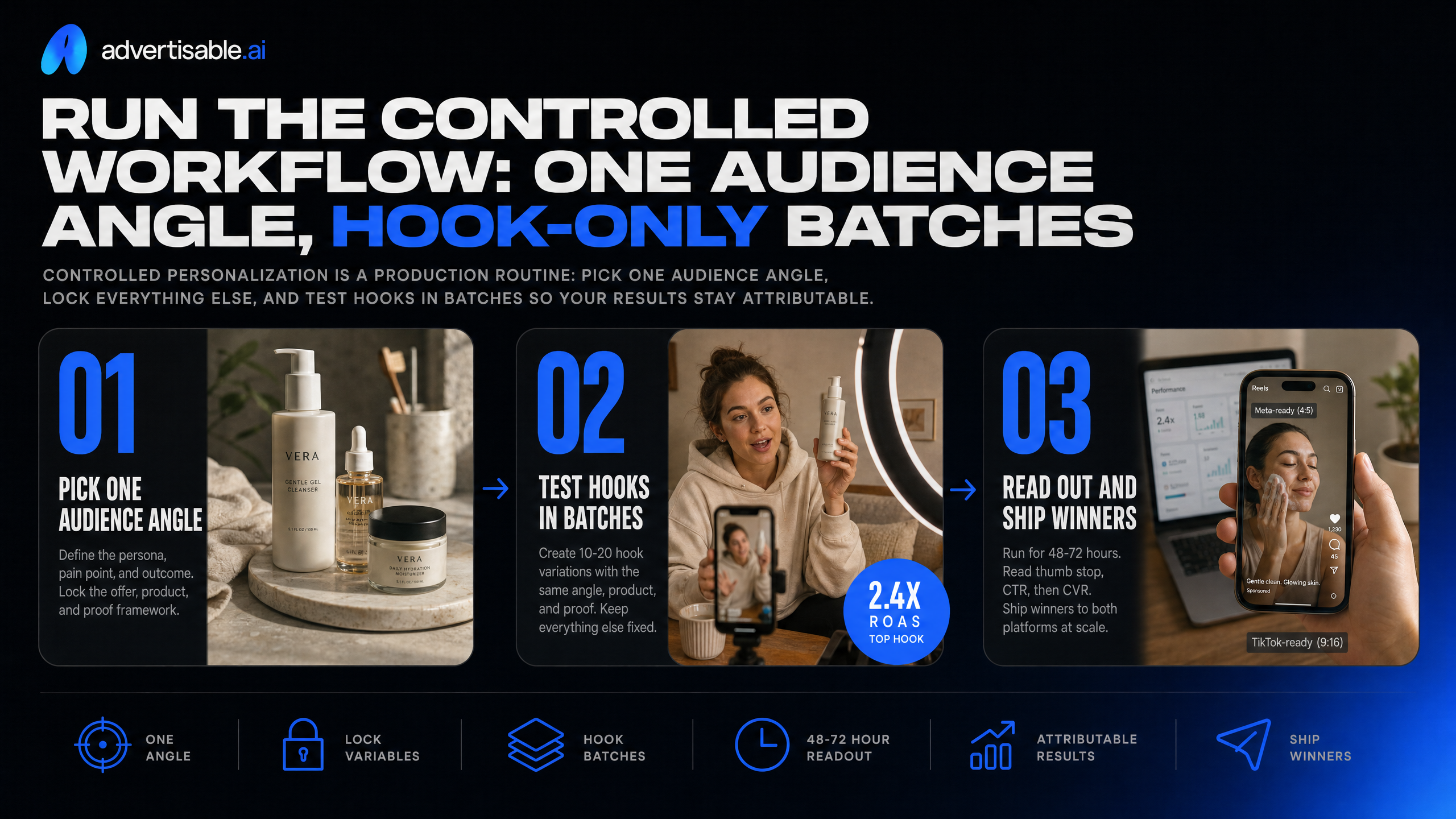
Controlled personalization is a production routine: pick one audience angle, lock everything else, and test hooks in batches so your results stay attributable. Try it once this week with a 10-20 ad batch and a fixed 48-72 hour readout.
Ship the same core creative to both platforms by exporting in Meta-ready and TikTok-ready formats, then reading performance against the same objective checkpoints (thumb stop, CTR, then CVR).
Storyboard the four beat anatomy
Your storyboard should never change structure between versions. Keep a four-beat anatomy and only rotate the hook, otherwise you will not know what caused the lift or the drop.
Beat 1 is the hook (the two-second opening) and Beat 2 is the product moment. We aim to reveal the product early and tie it directly to the hook promise so the viewer can answer “what is this?” before they scroll.
Beat 3 is your proof element. Pick one proof type that your brand can stand behind (for example: a concrete feature demonstration, an on-screen spec pulled from your product page, or a simple before-after outcome you can substantiate). Beat 4 is a CTA that matches the angle: the same audience that responds to “save time” usually needs a different CTA than the audience that responds to “premium quality.”
- Acceptance criteria: each beat is one clear idea, with the hook and product moment fully understandable even with sound off
- Proof selection rule: use one proof element per batch, and keep its wording and visual treatment consistent
- CTA alignment check: CTA language uses the same nouns as the angle (the exact problem, outcome, or use case), not generic “learn more” copy
- Version control: every variant uses the same beat order, shot count, and on-screen text layout so hook performance is comparable
Generate hook variations fast
Generate 10 to 20 hook variants at a time, with the product moment, proof, and CTA locked. That is the fastest way to learn what actually moves thumb stop without accidentally changing your offer or claim.
In Advertisable AI, we do this by locking guardrails in the Brand DNA Module and keeping the creative anatomy fixed in the Storyboard Editor. Then we regenerate only Beat 1 repeatedly until we have a full hook-only batch.
- Batch size: 10-20 hooks per audience angle, per product, per test round
- Locked beats: Beat 2 product moment, Beat 3 proof element, Beat 4 CTA stay identical across all variants
- Hook mix: outcome hook, pain-call hook, and audience-call hook (keep each hook to a single promise)
- Naming convention: Angle_HookType_V01-V20 (example: BusyParents_Outcome_V01) so results map cleanly back to the variable you changed
Fix one weak scene only
When one scene is dragging performance, do not rebuild the whole ad. Use frame-by-frame control to swap only the weak beat and keep the winning scenes untouched so you preserve what the platform already proved out.
The clean workflow is: identify the failure point, repair only that beat, and rerun the same batch structure for another 48-72 hours. A low thumb stop points to Beat 1; a decent thumb stop but weak CTR often points to the proof beat; a strong CTR with weak CVR usually means your CTA or promise clarity is off inside the ad.
For targeted repairs, use the Scene Regenerator to regenerate just the hook, proof, or CTA scene while leaving the rest of the storyboard intact. This is also how you control credit burn: one-scene fixes cost less than re-rendering an entire timeline and re-QAing everything.
- Frame-by-frame control swaps: replace on-screen text, b-roll, or the opening shot without changing timing of later beats
- Scene Regenerator repairs: regenerate only the underperforming beat (most often the hook) and keep all other scenes locked
- QA check before rerun: product moment matches the product page facts; proof language is unchanged unless proof is the variable under test
- Decision rule: keep any beat that is already hitting your internal bar for thumb stop or CTR, even if other beats need work
Test audience-specific versions without creating mixed-batch noise
The 48 to 72 hour readout
To avoid non-attributable results, you need a fixed 48 to 72 hour readout window per batch, and you do not change anything mid-flight. Give the platform enough time and a clean test - no changes partway through - and it can surface the strong creative performers, but only if the test stays clean.
Read performance in a strict chain so you do not “promote” a weak ad for the wrong reason: thumb stop first (did the first 2 seconds earn attention), then CTR (did the hook and promise create intent), then CVR (did the full ad and landing experience close).
Give every variant the same budget so you are not confusing “more spend” with “better creative,” and log the single variable you changed so the learning is reusable.
- Batch window: one start time, one end time (48 to 72 hours), no edits during the window
- Metric order: thumb stop, then CTR, then CVR
- Spend control: equal budget per variant for the entire readout
- Change log: write the one changed variable in the batch name (for example, Hook A vs Hook B)
How to scale the winners
Scale is a per-segment decision, not a global one. You promote the top-performing hooks within each audience segment, because a hook that wins for one segment often underperforms for another.
Then you roll those winning hooks into new angles without touching the rest of the creative anatomy. In practice, that means iterating hooks before you commission new edits or rebuild full videos; you are trying to buy clean learning, not create a new mixed batch.
In Advertisable AI, we do this by locking the Brand DNA Module and keeping the storyboard structure stable in the Storyboard Editor, then using the Scene Regenerator to swap only the hook scene. You end with a short, searchable log of what won and why, so the next batch starts faster.
- Promote: take the top 1 to 2 hooks per segment into higher spend placements
- Extend: turn the winning hook into 2 to 4 new angle statements while keeping product moment, proof, and CTA consistent
- Sequence: run another hook-only batch before changing proof, product moment, or CTA
- Document: capture segment, hook formula, visual pattern, and the single-variable result for reuse
Turn personalization into a controlled weekly output
You do not need 100 random variants. You need attributable learnings, clean Brand DNA guardrails, and a workflow your team can repeat every week.
In Advertisable AI, start by pasting your product URL to generate Brand DNA in the Brand DNA Module, then build one storyboard in the Storyboard Editor with a locked creative anatomy: hook, product moment, proof element, CTA. Keep the audience angle constant for the batch.
Next, generate 10 hook variations where the hook is the only variable. Hold product facts, offer, and proof constant. Export platform-ready assets via the Platform Export Module for Meta or TikTok, run a 48 to 72 hour readout, then use the Scene Regenerator to replace only the weakest scene and rerun the next batch.
Start the $5 3-day trial: paste your product URL, lock your Brand DNA, build one storyboard, and generate audience-specific hook variants - then test which version wins per segment.
Frequently Asked Questions
### Is there a way to achieve personalization at scale?
Yes, if you treat it like controlled production. Lock Brand DNA and non-negotiable product facts first, then run repeatable one-variable batches so each readout tells you exactly what changed and why performance moved.
### What is the 20 rule for ads?
Use it as a volume planning guardrail, not a creativity mandate. Aim for around 20 variations where you change one variable at a time, most often the hook, so you can get directional signal without creating mixed-batch noise.
### How to edit ad creative?
Edit at the scene level so you do not rebuild the whole ad. Keep the storyboard anatomy fixed, then replace only the weakest beat, usually the hook or proof element, and rerun the same test window to keep results comparable.
### How is Advertisable AI different from AdCreative.ai?
Advertisable AI is built for production-ready short-form video and UGC style ads with Brand DNA locking, storyboard-first control, and scene-level regeneration. The goal is controlled one-variable testing without brand drift or invented product details.
### What does 'Brand DNA locking' prevent?
It prevents brand drift and inaccurate outputs by enforcing your approved product facts and brand rules across every variation. That means fewer wasted iterations caused by invented claims, tone changes, or inconsistent visual standards.
### Why is one-variable testing important?
Because it makes your results attributable. When only the hook changes and the rest of the creative anatomy stays constant, your 48 to 72 hour readout can drive a clear next-test decision instead of post-hoc guessing.