How long does an AI ad generator take to ship?
The AI ad generator that ships fastest for your workflow is the one that minimizes QA, not the one that renders quickest. If you can lock Brand DNA and fix one bad scene without rebuilding the whole ad, you can usually get to production-ready creative in hours, not days.
Here’s what matters most right now:
- Time-to-ship equals render time plus QA time, and QA is usually the swing factor.
- The best speed signal is QA minutes per shipped variation, not time-to-first render.
- Brand guardrails only count if they prevent brand drift and product claim errors.
- Scene-level control matters because one bad scene should not trigger a full rebuild.
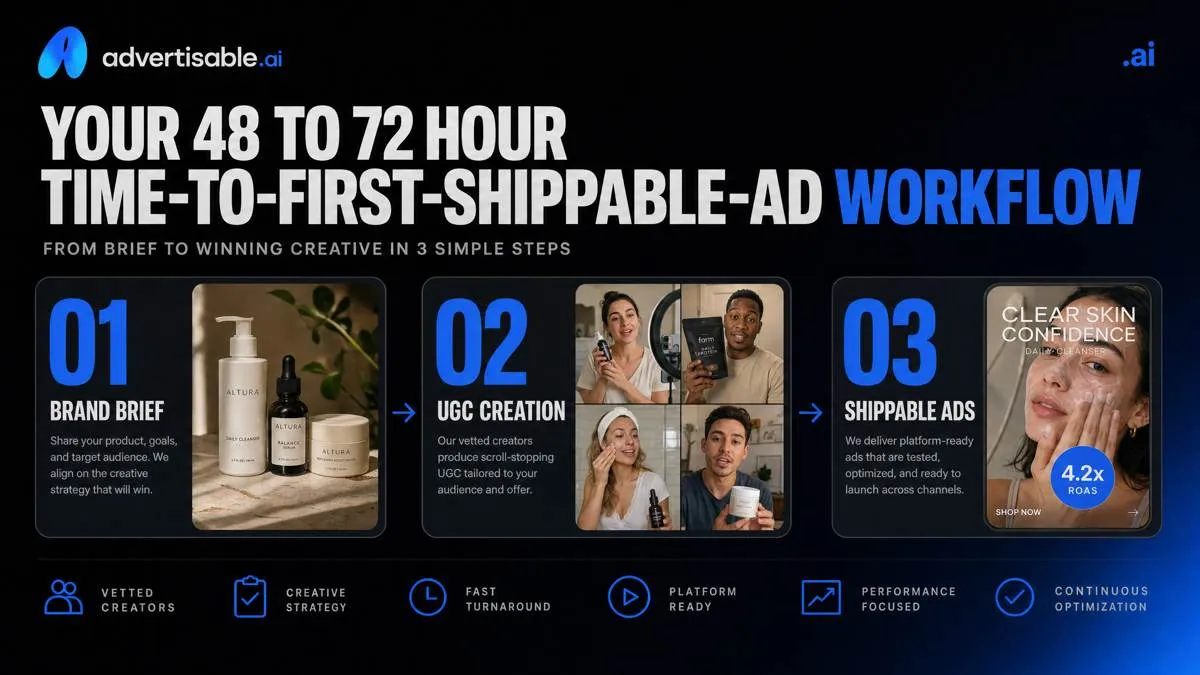
- A predictable workflow targets 48 to 72 hours to first shippable ad.
- Your first two hours should produce a usable draft you can iterate, not perfect polish.
- When you need output today, regeneration beats rerendering the entire ad repeatedly.
We built Advertisable AI Studio around this exact bottleneck: turning a product URL and prompt into production-ready creative while keeping Brand DNA locked and letting you regenerate specific scenes or frames instead of restarting. That is how you reduce QA and revision cycles while still producing video and static ads in multiple aspect ratios for paid social.
Before you judge any tool’s speed claims, you need a clean model of the real timeline: render time plus QA time, and the three speed bands that actually determine when an ad is ready to ship.
The real timeline is render time plus QA time
In practice, “how long does an AI ad generator take to ship” is mostly a question about approvals and rework, not raw render speed. You ship when the creative passes brand and claim QA, and when feedback does not force you to rebuild large parts of the asset.
Three speed bands that matter
Your timeline should be planned in speed bands that include review, not just generation. In our experience, teams miss deadlines because they budget for rendering minutes and forget stakeholder sign-off, brand checks, and export readiness.
Use these three bands as a baseline for setting expectations with marketing, legal, and channel owners:
- Same-day single concept ship: One concept, one primary aspect ratio, tight constraints, and a single reviewer path so you can approve fast and publish.
- 48-hour multi-variant batch: A controlled batch of hooks or angles where you can QA once against the same Brand DNA rules, then approve variants in a single pass.
- 72-hour first campaign pack: Your first full pack for a product, typically mixing video plus statics and multiple aspect ratios, with enough review time to catch brand drift before scaling volume.
What slows shipping in practice
Most delays come from avoidable QA loops. The slow part is not generating another version, it is realizing late that the version is unshippable and then reopening approvals.
These are the repeat offenders we see across performance teams:
- Claim corrections and rewrites: A single unapproved product statement can trigger legal or compliance review and restart your approval chain.
- Off-brand visuals and fonts: Brand drift forces subjective feedback, which tends to expand scope and add reviewers.
- Full re-renders after feedback: When a tool cannot adjust one scene or frame, small notes become full rebuilds and you lose previously approved parts.
- Aspect ratio rework: If exports are not channel-ready, you end up rebuilding layouts for 9:16, 1:1, and 16:9 instead of approving once and scaling.
The operational goal is simple: design your process so feedback resolves at the smallest possible unit, not at the entire ad level.
A 7-point checklist that predicts time-to-ship
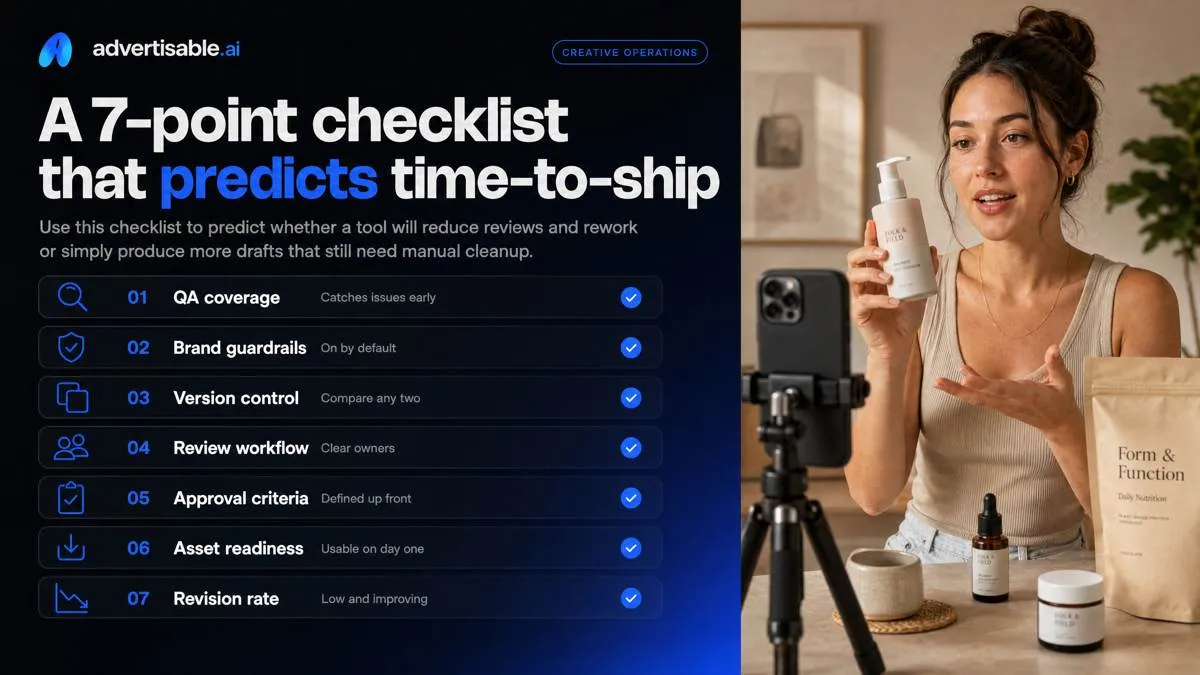
Time-to-ship is usually gated by QA, not generation speed. Use this checklist to predict whether a tool will reduce reviews and rework or simply produce more drafts that still need manual cleanup.
Brand guardrails that hold
The fastest tool is the one that makes it hard to be wrong. If brand rules and product facts are not truly locked, you will spend your time chasing drift across variants and re-checking basic accuracy.
In our experience, “brand settings” only matter when they behave like constraints, not suggestions. You want a reusable brand profile that travels with the account, so every new brief starts from the same non-negotiables instead of re-entering guidelines and hoping the model remembers them.
- Locked colors, fonts, and logo usage rules: enforce placement, sizing, and do-not-alter behavior so you do not get surprise treatments across scenes
- Approved claims and disclaimers: a controlled list of allowed phrases plus required legal lines, so you are not editing compliance at the end
- Product spec consistency across scenes: packaging, labels, dimensions, materials, and offer details stay identical from hook to CTA
- Reusable brand profile per account: a single source of truth you can apply to every generation and every team member
When these guardrails are real, review becomes a quick spot-check instead of a line-by-line rewrite.
Controls that cut rework
Rework explodes when you have to regenerate an entire ad to fix one bad moment. You should be able to regenerate at the scene or even frame level, keep the rest of the timeline intact, and move on.
A storyboard-first review flow is the other lever. You want approvals to happen before you spend cycles rendering full outputs, with a clean way to compare versions so stakeholders can approve changes without guessing what moved.
This is where tools like our Advertisable AI Studio focus: storyboard editor first, then scene-level regeneration, so you do not restart the whole asset because captions are off or a product shot is wrong.
- Scene-level regeneration: regenerate only the failing scene while keeping all approved scenes unchanged
- Storyboard-first review flow: review the structure, claims, and product moments before full generation
- Version compare for approvals: side-by-side or toggled comparisons to reduce subjective feedback loops
- Batch variants without drift: generate multiple hooks or angles while holding Brand DNA and product specs constant
Outputs that ship without extra tools
Shipping slows down when exports are “close enough” but not channel-ready. You want correct aspect ratios, captions that sit inside safe areas, and predictable files your team can upload without renaming and reformatting.
Also check whether you can get both static and video from one brief. That is a direct multiplier on testing volume, and it reduces the number of times you need to re-approve claims, specs, and layout.
- Meta and TikTok ratios export: generate and export the sizes you actually launch, not a single master you must adapt later
- Captions safe-area alignment: captions and key text avoid UI overlays and platform cropping by default
- Static and video from one brief: one input produces a coordinated set of creatives for testing
- File formats and naming controls: consistent export formats plus naming conventions that match your campaign and variant structure
When exports arrive channel-ready, your “time-to-ship” is measured in approvals, not in tool hopping.
Your 48 to 72 hour time-to-first-shippable-ad workflow
Hour 0 to 2: first draft
Your goal in the first two hours is not a “winner.” It is one shippable first pass you can judge for brand accuracy, product accuracy, and basic pacing.
Start with URL-to-ad ingestion. Pasting the product URL forces the system to anchor on the real packaging, variants, and on-page details, so your first output is based on your actual PDP instead of a generic prompt.
Pick one angle to test for this first pass only. Treat it as a single hypothesis (one promise, one proof point) so you can quickly tell whether the tool can hold a consistent story without you doing manual cleanup.
- Input: paste the product URL plus 2-3 lines of direction (who it is for, the one outcome, any must-say disclaimer)
- Angle selection: benefit, proof, or offer (choose one, not all three)
- Generate: one video ad and one static from the same angle so you can compare message clarity across formats
- Export: one primary ratio only (pick the channel you will test first) to keep review tight
The readout you want by hour 2 is simple: does the first draft require full rebuilds, or only targeted edits.
Hour 2 to 24: lock Brand DNA
Hours 2 to 24 are for removing judgment calls from production. You lock Brand DNA so every subsequent variant is constrained by the same non-negotiables, which is what keeps QA from expanding as volume increases.
Start with voice and claim constraints. Define what you can say, what you cannot say, and the tone boundaries (for example: no medical claims, no superlatives, no competitor mentions). Then set the visual rules that typically drift first: colors, fonts, and logo placement.
Finally, confirm the product specs that were pulled from the URL. This is where you catch the avoidable errors: wrong size, wrong count, wrong material, wrong variant name.
- Voice rules: approved vocabulary, blocked phrases, required disclaimers (if any)
- Claim rules: allowed outcomes and proof types, plus hard “do not claim” list
- Visual rules: primary and secondary colors, font choices, logo location and minimum clear space
- Spec rules: variant names, key attributes, and anything that must match the PDP exactly
- Generate three angle variants after Brand DNA is locked so differences are intentional, not random drift
Hour 24 to 72: ship variants
From hour 24 onward, you ship by limiting changes to scene-level fixes only. If you find yourself rewriting the whole concept, you are starting a new batch, not “revising.”
Run stakeholder review on the storyboard, not on final renders. Approving the scene sequence, on-screen text, and claim language before full generation prevents expensive back-and-forth.
Then export in the two ratios that typically cover paid social deployment: 9:16 and 1:1. Keep naming consistent so your media buyer can map creative to angle without opening files.
- Fix method: regenerate only the failing scene (hook, product reveal, proof moment, CTA) and keep the rest stable
- Review artifact: storyboard with scene thumbnails and text overlays for fast approvals
- Exports: 9:16 and 1:1 from the same approved storyboard so you preserve message order
- Launch: a small-budget test per angle variant to validate performance before scaling
This is where Advertisable AI Studio tends to earn its keep operationally: you do not trade speed for brand drift, and you do not rebuild an entire ad because one scene missed.
Proof you can trust: measure QA minutes per shipped variation
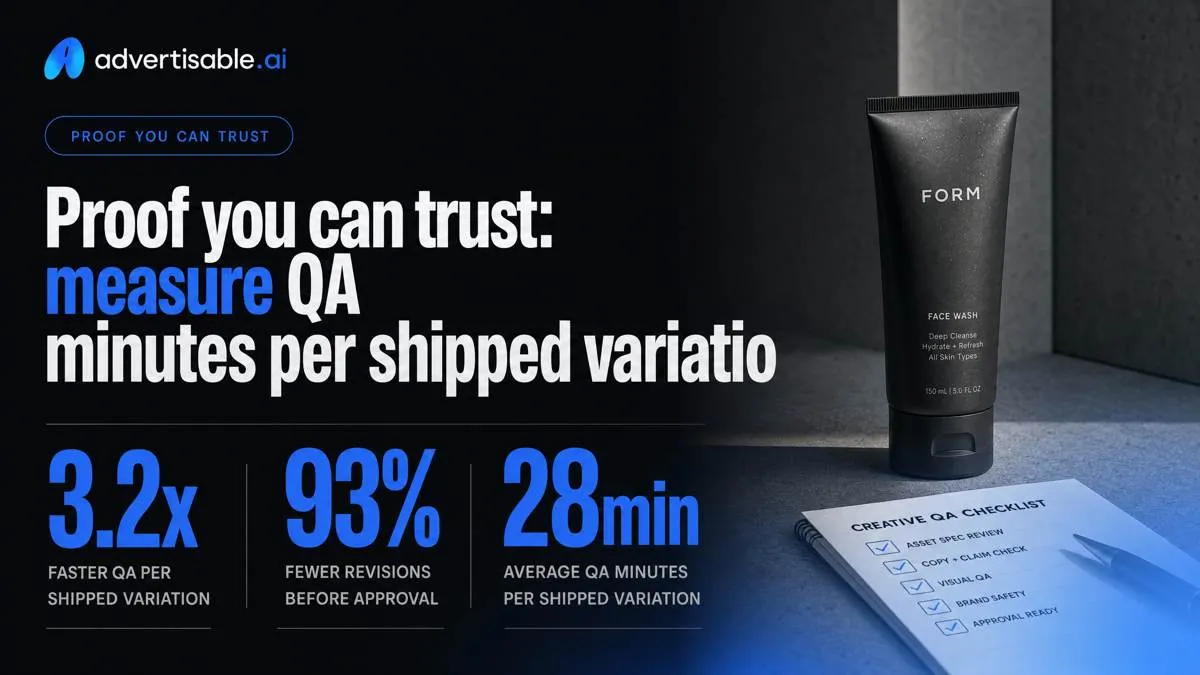
Speed claims are easy to market and hard to operationalize. The planning metric that holds up in the real world is QA minutes per shipped variation, because it rolls quality, revisions, and approvals into one number you can staff against.
The shipping throughput equation
To predict how long an AI ad generator takes to ship, you need one equation that turns output into throughput. We model it as QA minutes per shipped variant, not render time.
Track four inputs over a 48-72 hour window and you can forecast weekly capacity and cost per shippable output without guesswork.
What we look for is stability: low QA time, fewer approval loops, and the ability to fix one failing scene without restarting the whole ad. Tools with storyboard-first workflows and scene-level regeneration tend to reduce the penalty of one bad moment.
- QA minutes per variant: hands-on time to review, flag issues, and request changes
- Approval passes per iteration: how many internal or client reviews each variant typically needs before it is cleared
- Regen count per shipped ad: how many regenerations it takes to reach a version you will publish
- Shippable variation rate: shipped variants divided by total generated variants in the batch
When you multiply these together, you stop debating “fast” in the abstract and start planning production like a queue with known cycle time.
A 10-variant acceptance test
Run a small acceptance test that forces the tool to prove shippability, not just creativity. Ten variants is enough volume to expose where QA explodes.
Generate two distinct angles with five variants each, then review them the way you would in production: storyboard first, then frame-level inspection where needed.
- Build: 2 angles x 5 variants each from the same product URL and Brand DNA constraints
- Log failures by scene type: hook, product packshot, on-screen text, claim lines, CTA, audio or captions
- Track time to fix: minutes from first flag to approved fix, and whether a single-scene regen solved it
- Decide keep or switch: keep if most variants ship with predictable QA minutes; switch if failures cluster in the same scene types or fixes require repeated full rebuilds
QA and brand-safety: the red flags that add days
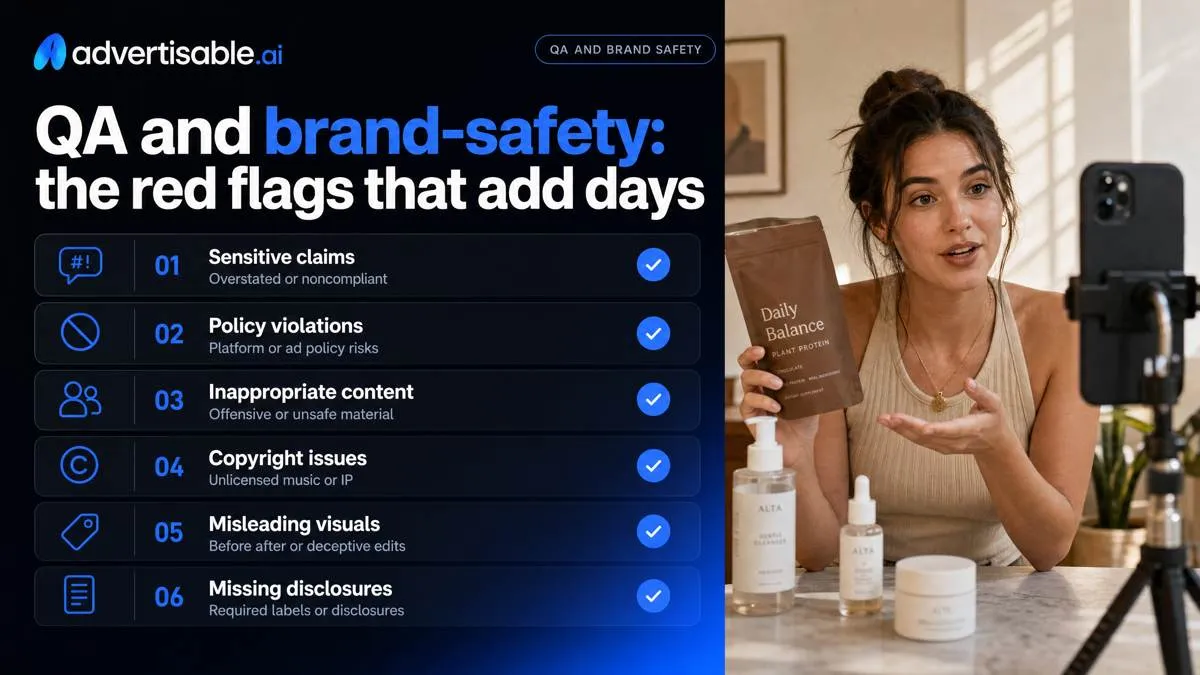
Brand drift and claim errors
The longest review cycles come from preventable inconsistencies that force stakeholders to re-watch the whole asset, not just the “bad part.” Your goal is to make QA a quick confirm, not a forensic investigation.
What we see most often is drift introduced across variations and aspect ratios: one frame is accurate and on-brand, the next quietly breaks a spec, a claim, or an identity rule. That triggers legal, brand, and platform re-review all at once.
- Spec mismatches across frames: pack size, ingredient callouts, pricing, offer terms, or product name changing between scenes, captions, and end cards.
- Unapproved benefits and guarantees: “results in X days,” “cures,” “best,” “risk-free,” or implied outcomes you cannot substantiate from your approved claims list.
- Visual identity inconsistency: logo placement and clear space shifting, fonts swapping, off-palette colors, or inconsistent product render angles that look like a different SKU.
- Missing disclaimers where required: offer restrictions, testimonials needing qualification, material connections, or category-specific footnotes that must appear on-screen.
Platform rules you must meet
Even a perfectly on-brand ad can stall if it is not built to pass platform review. Treat Meta and TikTok policies as hard constraints you design into the storyboard before you generate variants.
Meta Ads policies compliance usually breaks on prohibited content, misleading claims, and landing-page consistency. TikTok Ads policies compliance tends to be stricter on sensationalized claims, deceptive before-and-after style, and anything that looks like it targets sensitive traits.
Plan for synthetic media disclosure needs anytime you use AI avatars, synthetic voice, or altered footage. Put the disclosure into the creative spec so it is not debated at the end.
Health and finance claim limits are where teams lose the most time. Keep claims factual, qualified, and aligned to what you can prove, and avoid guarantees or personal-attribute targeting language.
QA pass criteria we use: claim text matches your approved list, on-screen disclosure included where required, and the landing page supports what the ad says.
When you need output today, use a studio built for regeneration
Shipping today is rarely blocked by render speed. It is blocked by rework: someone spots the wrong spec, the voice drifts, or one scene looks off and the whole ad gets rebuilt. A studio built for regeneration keeps your cycle tight so you spend your day approving and launching, not restarting.
In Advertisable AI Studio, the fastest input is your product URL. Drop it into Product Ads Mode and you start from real packaging, labels, and on-page specs, which cuts the most common QA loop: fixing preventable product inaccuracies after the creative is already assembled.
Then you lock constraints once with Brand DNA, so your specs and voice do not drift across variations. Treat it like a non-negotiables file: colors, fonts, logo rules, approved claims, and the product details you cannot afford to get wrong.
When something still needs fixing, you do not rebuild the whole ad. You regenerate at the scene level, swapping a single weak hook, shot, or frame while keeping everything else intact. That is the difference between a same-day launch and a second round of “back to draft.”
Finally, export in multiple aspect ratios in one pass so you can launch across placements without reformatting your entire creative set.
Ship faster by reducing QA, not by chasing render speed
If you want a predictable time-to-ship, treat your workflow like a system. Your inputs are a product URL, your Brand DNA, and one clear angle. Your constraints are non-negotiables: approved claims, correct specs, and consistent visual identity.
Your goal is simple: more shippable variations, with fewer QA minutes per export.
In Advertisable AI Studio, you start with URL-to-ad ingestion, then approve the storyboard before you spend credits. When one scene misses, you fix only that scene with scene-level control instead of rebuilding the full video. That is how you keep throughput high when you are testing hooks across Meta and TikTok formats.
Run this acceptance test today: generate 3 angles from one product URL, lock Brand DNA, regenerate one weak scene, then export your aspect ratios and launch.
Frequently Asked Questions
### What is the best AI ad generator?
The best choice is the one that consistently produces production-ready creative with the least QA per shipped variation. Prioritize tools that lock Brand DNA, support storyboard-first review, and let you regenerate a single scene without re-rendering the entire ad.
### Can ChatGPT generate ads?
ChatGPT can help you draft concepts, hooks, and prompts, but it is not an AI ad generator by itself. If you need production-ready video and statics from a product URL with brand guardrails and scene-level fixes, you need a dedicated studio workflow.
### Can AI create an ad for me?
Yes, if you give it the right inputs and constraints: a product URL, approved claims, and defined brand rules. In Advertisable AI Studio, you can generate Product Ads, UGC-style ads, and B-Roll style ads, then iterate scene-by-scene until the output is ready to ship.
### What happens if I regenerate just one scene instead of the whole ad?
You replace only the failing scene while keeping the rest of the ad unchanged. Operationally, that reduces rework, keeps your approved frames intact, and helps you ship more variants on a tight timeline.
### How does Brand DNA prevent product claim errors in my ads?
Brand DNA locks your non-negotiables, including product specs and approved claims, so generations stay consistent across variations. When your constraints are set correctly up front, you spend less time in QA catching brand drift or inaccurate product details.