AI Ads for Pet Brands
Pet brands produce better-performing ads quickly with AI when you lock product accuracy and claims first, then scale controlled variations from a single approved storyboard.
Here’s what matters most right now:
- Start with Product URL import so packaging, ingredients, and claims match the source page.
- Lock your Brand DNA Module so fonts, colors, voice, and approved claims cannot drift.
- Build one storyboard: hook, problem, proof, offer, CTA, then treat it as your control.
- Batch 5 to 10 hook-only variants per angle, holding proof and offer constant.
- Use 48 to 72 hour readouts, then scale winners and kill noise quickly.
- QA for three failures: pack accuracy, claim creep, and missing disclaimers before launch.
- Fix only the broken scene with scene-level control instead of rerendering the whole ad.
- Export native 9:16, 1:1, and 16:9 versions so placement fit does not distort hooks.
We built Advertisable AI Studio for this exact production bottleneck: you paste in a product link, our system extracts Brand DNA, you approve a storyboard in the storyboard editor, then you generate controlled variations with claims discipline and scene-level and frame-by-frame control. When something breaks in review, our QA Module helps you catch it, and you regenerate only the scene that failed, then export platform-ready assets for Meta, TikTok, and YouTube.
Once accuracy is locked, the next job is emotional truth: making the owner-pet bond feel real on cold traffic without slipping into generic AI sameness.
Make pet buyers feel the bond without looking fake
The big truth in pet creative is simple: drift kills ROAS. The moment your ad shows the wrong label detail, implies a benefit you cannot defend, or renders a pet in a way that feels “off,” you lose trust before you ever earn a click.
Winning ads treat accuracy plus emotion as one system. You lock product truth as the floor, then you earn the bond with real-feeling moments that reassure the owner and show the pet thriving.
Why pet ads win on emotion
Pet ads convert because they reduce anxiety fast: “Will this be safe, will it work, will my pet actually like it?” You are not just selling a product, you are selling reassurance to a caretaker who feels responsible for outcomes.
The proof is rarely a lab-style claim in cold traffic. It is the pet’s visible comfort and happiness: relaxed body language, engagement, and a “this is normal in our home” moment that makes the benefit feel believable.
You have a tight window to establish trust signals in the first seconds, because that is when buyers decide whether the ad is credible or generic. neuroscience research on emotional ads aligns with what we see in performance data: emotion and attention are tightly linked, and faces and vulnerability can drive higher liking.
- Owner care and reassurance cues: calm voiceover, clear “what it is” on screen, and no vague miracle language
- Pet happiness as proof: show a specific, normal behavior that matches your promise (eating readily, settled after a walk, playful engagement)
- First-seconds trust signals: accurate pack shot, readable product name, and benefit phrasing that stays inside your approved claims list
The uncanny pet failure mode
The fastest way to make AI creative feel fake is an animal that moves wrong. Humans will forgive imperfect lighting. They do not forgive a dog whose gait glitches, a tail that warps, or paws that slide without weight.
The second failure is detail-level weirdness: glassy eyes that do not track, asymmetrical pupils, fur that looks airbrushed, or whiskers that flicker frame to frame. In pet ads, those micro-errors read as deception, not “style.”
The believability bar is higher for animals than for products because buyers are emotionally calibrated to read pets as living beings. That is why control is a prerequisite: you need product-locked rendering plus scene-level control so you can fix one broken shot instead of rerendering an entire concept and introducing new errors.
- Anatomy QA: count limbs, check jaw alignment, confirm ears and tails keep consistent shape across cuts
- Movement QA: look for sliding paws, looping motion, and physics breaks in jumps, turns, or head tilts
- Eye and fur QA: confirm eyes track naturally, no flicker, and fur retains texture (not plastic shine) across frames
Treat pet ads as a different creative category
Pet creative converts on relationship cues first. The owner-pet bond is the spine that makes the ad feel real, and “real” is your first compliance layer: it reduces the temptation to over-narrate benefits or let AI fill gaps with invented details.
Your second spine is product truth. In our experience, disapprovals and weak performance cluster around the same failure mode: packaging and claims drift. Buyers verify what they see, and the NCBI study on product trust maps to this directly: people use trusted cues like labels and other assurance signals to judge quality when the attribute itself is not visible.
Show the pet responding
Pet ads need visible response, not just a human talking at camera. We treat “pet engagement on-screen” as an objective acceptance criterion because it anchors authenticity and keeps you out of purely narrated promises that platforms and customers both scrutinize.
Build your storyboard so the pet does something observable with the product, then test only the hook in controlled batches. Run 5-10 hook variants and hold the proof moment constant, then read winners after 48-72 hours so you are not mixing variables.
- Genuine interest and engagement: sniffing, pawing, tail wag, following the owner, choosing the product over a neutral alternative (a bowl, a toy, an empty hand)
- Clear product in-frame moments: label-side pack shot, product dispensing, serving size shown, the pet actually consuming or interacting, then a quick return to the owner-pet interaction
- Avoid purely narrated promises: replace “this will fix X” voiceover with observable behavior plus restrained on-screen text that matches your approved claims list
Keep packaging and product exact
In pet, “close enough” packaging is not close enough. A single wrong colour, swapped word, or altered jar shape signals a fake ad and is a common trigger for disapprovals, especially when the rest of the creative looks polished.
Lock product truth before you generate variations. In Advertisable AI Studio, we use Product URL Import plus the Brand DNA Module to keep label details and approved claims consistent, then fix failures with scene-level control instead of rerendering the entire video.
- Label text and colours match: same product name, flavour, claim language, and brand palette as the source page, with no “AI-cleaned” typography substitutions
- Size and shape consistency: container height, cap type, scoop/dropper form, and count of units match what you sell, including any visible fill level or bundle count
- No invented ingredients or variants: no “new chicken recipe,” “extra strength,” or added actives unless that exact variant exists on your product page and in your approved asset set
Use the pet formats that consistently test well
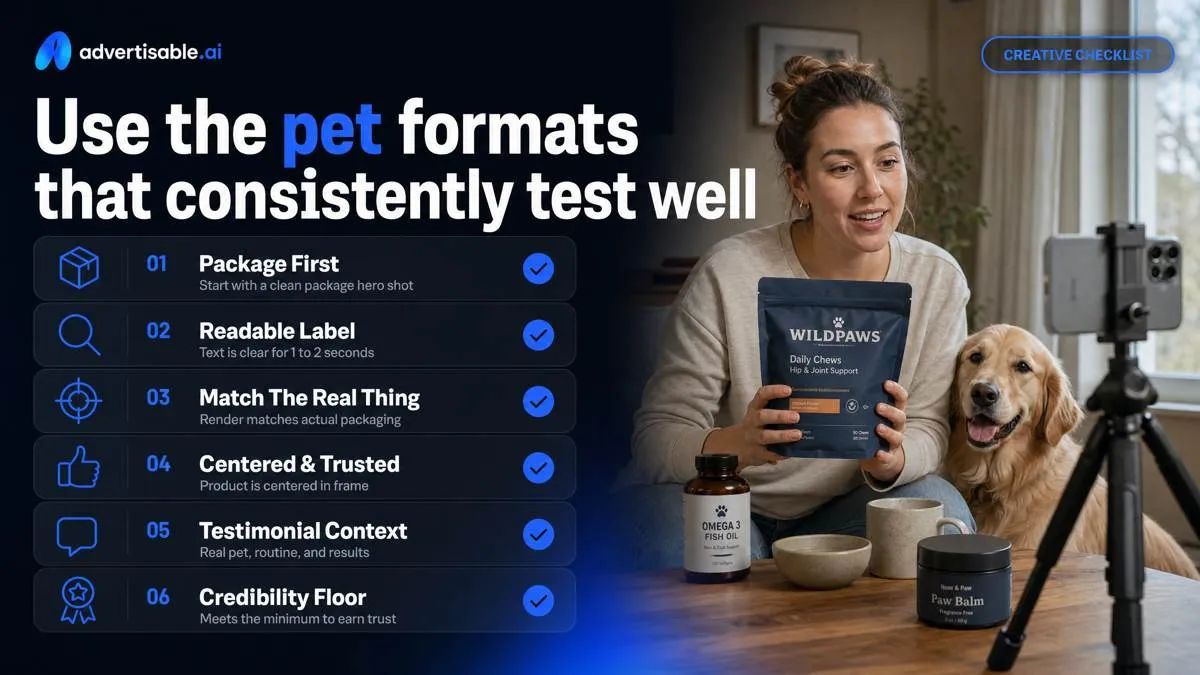
Start every storyboard with a clean package hero shot, because it sets the credibility floor. Your acceptance criteria is simple: label text is readable for 1 to 2 seconds, the render matches your actual packaging, and the product is centered in the first frame you want a viewer to trust.
Layer in testimonial style, but keep it defensible. Use specific, lived context (pet type, routine, what changed) and avoid medical-sounding promises or extreme outcomes that trigger disapprovals and make the creative feel synthetic.
Pet-in-use UGC scenes
Pet-in-use beats product-on-white because it shows cause and effect in under 3 seconds. Build three repeatable micro-scenes into your storyboard: anticipation, the moment of use, and a clear reward that reads on mute.
For treats, the highest-clarity sequence is hand enters frame, pet locks in, treat given, reward behavior. Your QA check is that the pet’s anticipation is visible before the product appears, so the product feels like the payoff rather than the interruption.
For toys, prioritize repeat engagement over a single cute moment. Two short cuts of the same toy interaction (chase, tug, fetch) signals “this holds attention,” which is more convincing than one long clip.
For feeding, shoot the routine, not just the bag. Bowl shots are the proof: scoop or pour, bowl fill, first bite, and a quick empty-bowl beat to close.
- Anticipation and reward: 0.5 to 1.0s anticipation, 0.5 to 1.0s reward behavior (tail wag, sit, focus) with the pack visible once
- Toy play: 2 separate 1-second cuts of interaction, same toy, same pet, same location to read as repeatable use
- Feeding routine: scoop-to-bowl, bowl-to-pet, and one overhead bowl angle for ingredient texture credibility
Owner-pet bond moments
Owner-pet bond moments are the fastest way to make an AI-generated ad feel like real UGC. The operational goal is trust, and the easiest control lever is a caring-owner voiceover that anchors the scene in a normal routine.
Write VO like a diary note, not a pitch: what you do, when you do it, and what you noticed. Keep one variable per batch: test 5 to 10 voiceover hooks while holding the pet, room, and product shot constant for a 48 to 72 hour readout.
Touch and praise are your physical proof. A hand on the collar, a scratch behind the ears, a calm “good job” beat, then the product moment. It reads as care, not selling.
Home context beats studio vibe because it signals real life constraints. Messy entryway, lived-in kitchen, laundry basket in the background are not flaws if the product and claims stay clean.
- Voiceover acceptance criteria: 1 routine detail (time of day or situation), 1 observation, no exaggerated outcomes
- Bond beats to capture: touch, brief eye contact, praise cue, then the product use moment
- Context QA: natural lighting is fine, but avoid backgrounds that imply a clinic or professional service unless that is your actual setting
You are not manufacturing emotion; you are documenting care in a way that is repeatable across creators and variations.
Before and after proof clips
Before and after clips work when you control the comparison and keep claims disciplined. Your objective metric is “same framing, same lighting, same pet,” so the viewer attributes the change to the routine, not to editing.
For coat and shedding, avoid dramatic hair piles unless you can reproduce them credibly. Better is a grooming brush close-up, a consistent “before” pass, then an “after” pass in the same spot with less visible loose hair.
For breath, dental, and hygiene, keep it practical. Show the routine (chew, water additive, wipe) and the pet’s acceptance, not a clinical transformation. A 7 to 14 day timestamp overlay can work if it reflects your actual customer story and you can support it internally.
For behavior and training, progress is the proof: fewer jump-ups, longer sit-stays, calmer leash exits. Use two matched clips (same doorway, same handler cue) so improvement reads immediately.
- Comparison lock: identical angle and distance, consistent on-screen text, and no filters that change coat color or tooth shade
- Grooming proof options: brush pass, lint roller on fabric, or black-shirt test with consistent framing
- Hygiene proof options: routine demonstration plus pet compliance (no struggle), not “medical” language
- Training proof options: 2 matched cues (sit, stay, place) with a clear time gap label you can verify
Run an accuracy-locked AI workflow in Advertisable AI Studio
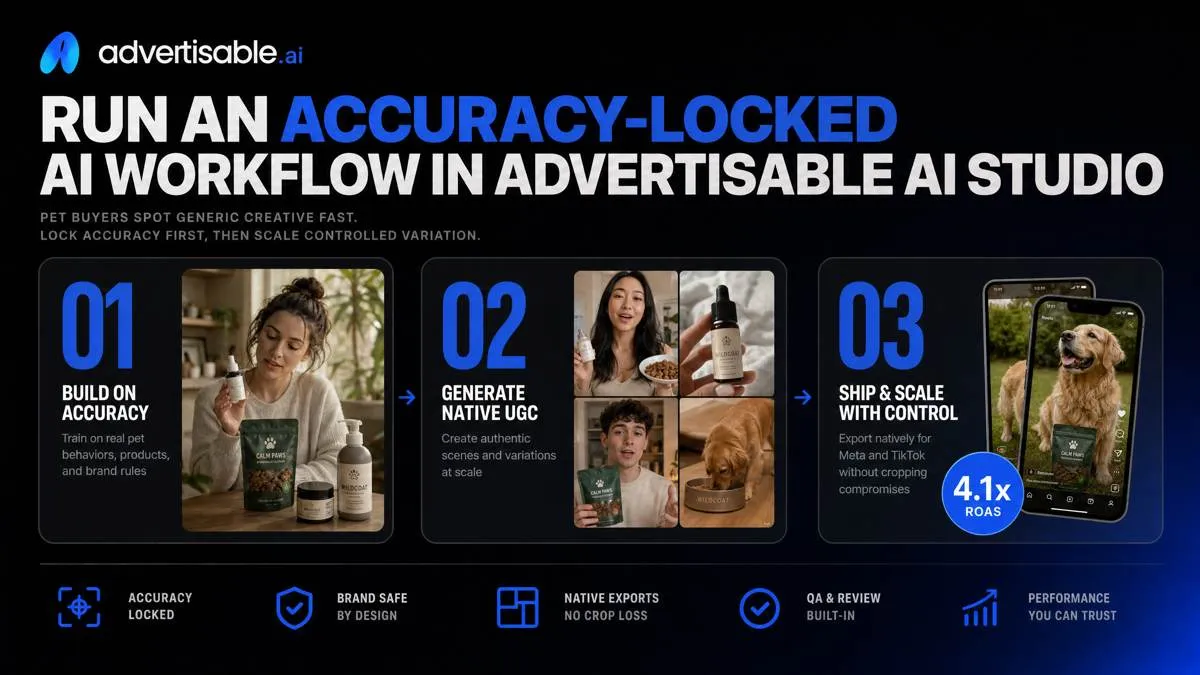
Pet buyers spot generic creative fast, and the fastest way to avoid that is to lock accuracy first, then scale controlled variation. In Advertisable AI Studio, you build once and ship native exports for Meta and TikTok without cropping compromises. If you want to validate the workflow on one hero SKU, the $5 3-day trial is enough time to generate, QA, and read early performance.
Import your product URL first
Start by importing the product URL so the system pulls facts from the source page and uses them as the baseline for every scene. This is the quickest way to stop “AI drift” that makes pet ads feel fake on cold traffic.
Operationally, we treat the product page as the single source of truth: product name, variant, on-page claims language, pack visuals, and any required qualifier text. When those inputs are anchored, your first render becomes a product-locked rendering baseline you can safely iterate from instead of re-creating the ad from scratch each time.
This also reduces wrong-pack failures, where the video shows the wrong flavor, an outdated label, or an invented badge. Those errors do not just hurt trust, they create review risk and wasted spend because you are testing a hook on a creative that cannot be approved.
- Acceptance criteria before you generate variations: pack shot matches the current PDP images; visible label text is not hallucinated; variant name and key attributes match the page
- QA spot-check: compare the first frame with the product render to the PDP hero image, then confirm any on-screen product facts are present on the source page
- Remediation rule: if only the pack shot is wrong, fix that scene, not the full ad
Lock Brand DNA and claims
Lock Brand DNA and claims before you scale variants, or your outputs will slowly become interchangeable with every other pet brand ad. The goal is consistency across 20 to 50 variations without “creative roulette” in look, tone, or compliance language.
In the Brand DNA Module, you lock fonts, colours, and voice so your lower-third styling, captions, and pacing stay recognisably yours. Then you enforce claims discipline: the copy can only use your approved claims list, which protects you from performance teams “improving” wording into something you cannot defend.
Disclaimers are part of the system, not a last-minute overlay. You want the right disclaimer present every time so you are not re-editing exports per platform or risking a missing qualifier in one variant.
- Guardrail checklist: brand fonts applied to all on-screen text; approved colour palette used for backgrounds and CTA frames; voice rules set (dos and don’ts for tone)
- Claims control: only approved phrases can appear in voiceover, captions, and supers; anything else is a failed QA state
- Disclaimer rule: disclaimer appears in the designated scene with readable size and duration, and persists across all hook variants
Batch-test hooks, hold proof constant
To get a clean performance readout, build one storyboard and test 5 to 10 hooks while holding proof and offer scenes constant. This is single-variable testing, and it is the difference between “we learned something” and “we shipped noise.”
In our workflow, the storyboard is fixed: hook, problem, proof, offer, CTA. You only regenerate the hook scene across the batch, so you are not accidentally changing product shots, benefit proof, or the offer mechanics at the same time.
Run the batch for a 48 to 72 hour readout, then pick a winner to iterate. Your next decision is narrow: keep the winning hook concept and test new executions, or keep the execution and test a neighboring angle.
- Constants for the whole batch: identical proof scenes, identical offer scene, identical disclaimer scene, identical CTA framing
- Only variable: hook scene script and first-frame visual
- Winner selection at 48 to 72 hours: promote the top performer, pause obvious losers, and queue the next 5 to 10 hook variants off the same storyboard
QA and fix only what breaks: pets, packs, claims
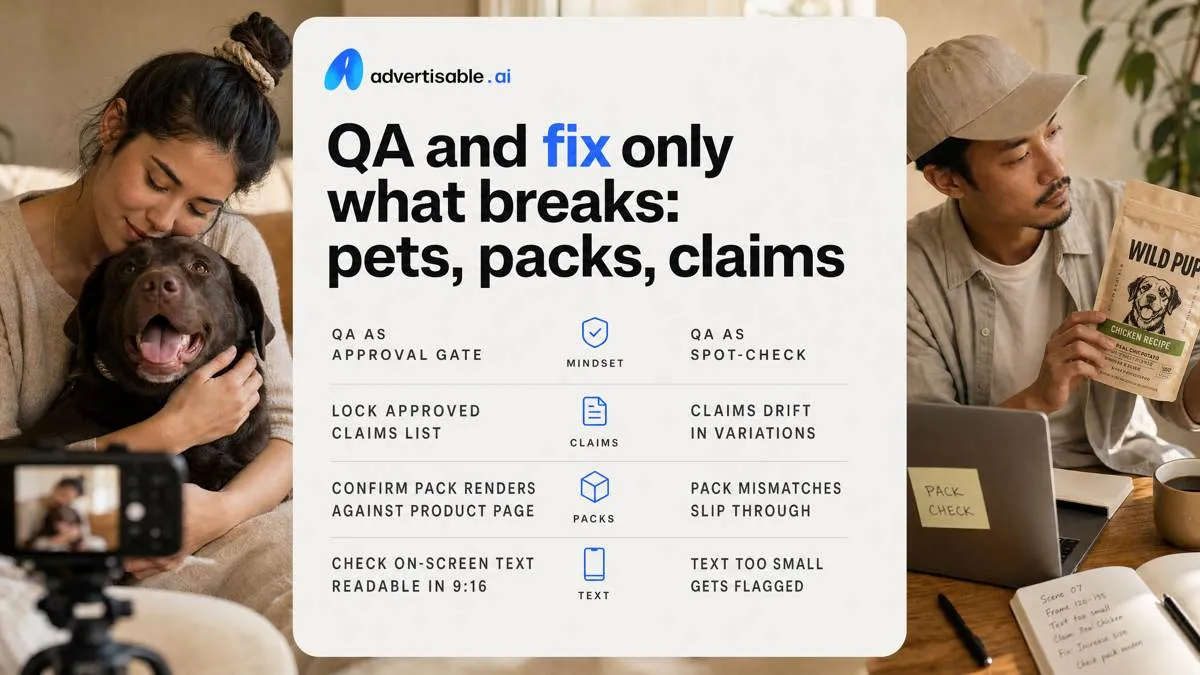
You prevent disapprovals by treating QA as an approval gate, not a spot-check. Pre-launch, lock an approved claims list, confirm pack renders against the product page, and run a final pass for readable on-screen text in 9:16.
Post-launch, capture failures as notes tied to the exact scene and frame range, plus the corrected copy or pack reference. Those notes become your next batch guardrails so the same drift does not re-enter at variation 6 or 60.
Pet believability acceptance checks
Pet realism is a compliance issue because “uncanny” motion reads as fake and sinks trust fast, usually in the first 1-2 seconds. Your acceptance criteria should be objective enough that a reviewer can pass or fail a scene in under 30 seconds.
Focus on three failure modes: bad biomechanics, bad mouth behavior, and inconsistent identity across cuts. You are not judging art, you are verifying the animal behaves like the species and breed you are implying.
- Anatomy, gait, physics: paws contact the ground, weight shifts on turns, tail inertia matches speed, no sliding shadows
- Mouth, tongue, chew realism: jaw closes on treat, tongue placement is plausible, chew cycles are rhythmic (not random open-close), no object phasing through teeth
- Consistent breed and coat cues: same ear shape, muzzle length, markings, and coat color across every scene that shows the pet
Packaging and text QA checks
Most disapprovals we see are not from the hook, they are from pack and claim drift. Treat the product page as the single source of truth and fail any scene where a viewer could zoom and catch a mismatch.
In Advertisable AI Studio, Product URL Import plus the Brand DNA Module reduces this drift by keeping product-locked rendering and approved language consistent across variations, but you still need a human pass for legibility in the final export.
- Label legibility and match: brand name and product name are readable on mobile; label layout matches the real pack (not “close enough” typography)
- Variant, size, flavour accuracy: the exact SKU shown is the SKU named in voiceover and on-screen text
- Ingredient and dosage consistency: any ingredient callout, feeding amount, or supplement dosage mirrors the product page wording and units
Scene-level fixes, not full rerenders
You do not need to rerender an entire ad to fix one compliance failure. The correct operating model is: isolate the failing scene, regenerate only that scene, and hold the rest constant so your 48-72 hour readout stays clean.
Use frame-by-frame control when the issue is localized, like a single bad chew frame, one unreadable label frame, or a claim line that creeps outside your approved list. Replace the minimum footage needed to pass review while preserving the winning hook and offer that already earned attention.
- Replace only failing scene: keep the storyboard, timing, and offer card unchanged, swap the one scene that failed QA
- Frame-by-frame control cleanup: trim or regenerate the specific frames where pack text blurs, the pet clips, or a claim appears
- Preserve winning hook and offer: do not “fix” performance by changing variables you are not testing
Put accuracy in control, then scale what works
If you want AI ads that pet buyers trust and platforms approve, you need a system that prevents drift before you chase volume. We built Advertisable AI Studio for that exact workflow.
Start with one hero SKU. Import your Product URL so the Brand DNA Module can lock your product facts, packaging, tone, and approved claims. Build one storyboard in the Storyboard Editor, then generate 10 hook variants while you hold proof and offer constant for a clean readout in 48 to 72 hours.
Before you publish, run your QA acceptance criteria: pack shot match, claims discipline, and readable disclaimers. If anything fails, fix only that scene with Scene-Level Control, then export platform-ready versions for Meta and TikTok.
Frequently Asked Questions
### Is AI advertising illegal?
AI advertising is not inherently illegal, but you are still accountable for truthful claims, accurate product representation, and platform policies. Treat AI as a production method, then enforce claims discipline and packaging accuracy with QA before launch.
### Why does my AI ad look generic compared to competitor ads?
Most ads look generic when the inputs are generic and the system allows brand and product details to drift. Lock Brand DNA and product facts first, then test hooks as single-variable batches so you improve specificity without breaking accuracy.
### How many ad variations should I test before I pick a winner?
Run 5 to 10 hook variants from one approved storyboard, and keep proof and offer constant. Read results after 48 to 72 hours, then only change one variable in the next batch so you know what actually moved performance.
### What should my QA checklist include before launching a pet product ad?
Verify the packaging render matches the real pack, every claim is approved and sourceable, and any required disclaimers are present and readable on mobile. When something fails, regenerate only the broken scene instead of rerendering the entire ad.