AI Ads for Food Brands
You can ship AI ads for a food brand fast, and still get punished for it. One slightly wrong pack shot, one ingredient that never existed, one “better-for-you” line that drifts from your label, and you are not testing creative anymore, you are creating distrust and disapprovals.
Here’s what matters most when you need volume without off-brand drift:
- Lock packaging, ingredients, and approved claims before you generate any variations.
- Optimize for appetite appeal, not generic “AI polish” that reads fake on cold traffic.
- Use recognizable occasion frames like breakfast, snack, or post-workout to anchor believability.
- Run 5 to 10 single-variable tests by changing only the hook scene.
- Use 48 to 72 hour readouts, then regenerate weak scenes on winners only.
- QA every batch against your product page so label and claims stay consistent.
We built Advertisable AI Studio for this exact operator problem: generate shippable variations from a Product URL import, lock Brand DNA, approve a storyboard first, then use scene-level control and frame-by-frame control to iterate without full rerenders. You export in channel-ready formats for Meta, TikTok, and YouTube, with a lightweight QA checklist that keeps product truth intact as you scale.
Before you touch formats or hooks, you need to neutralise the two risks that kill AI food ads: misrepresented product visuals and claim or label drift.
Start by neutralising the two risks that kill AI food ads
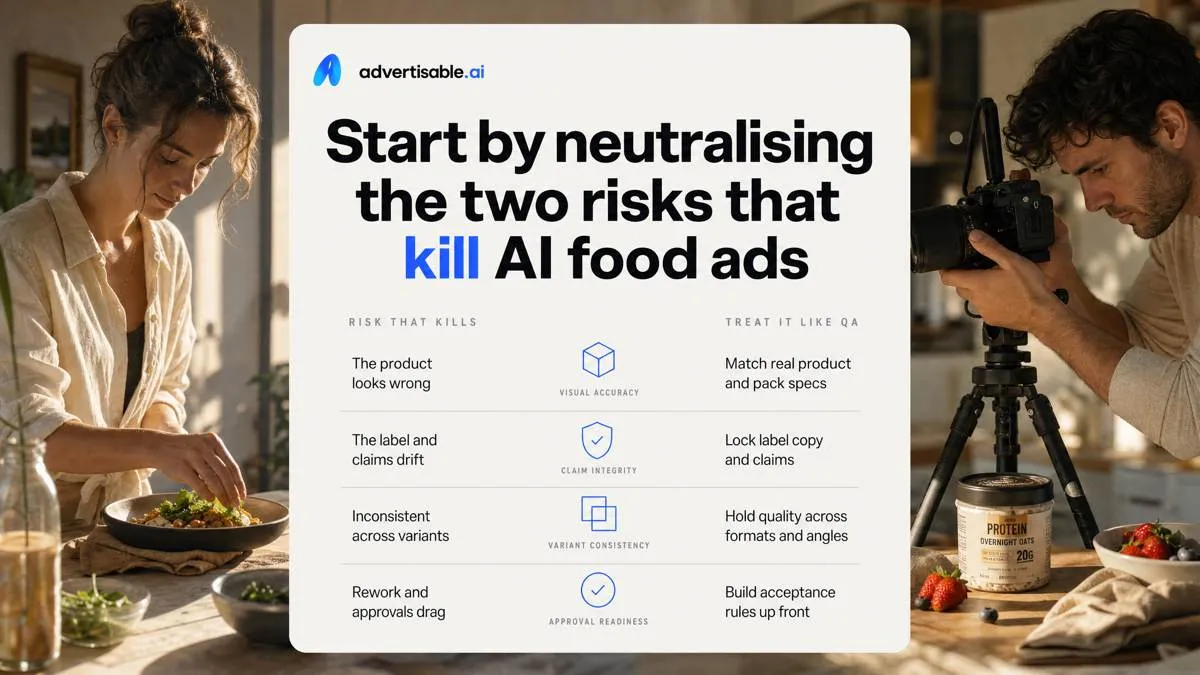
In scaled AI creative, two things reliably blow up: the product looks wrong, or the label and claims drift. Treat both as QA problems with acceptance criteria, not “creative freedom.”
Misrepresented product visuals
Most backlash starts with a single frame that looks “AI”: rubbery cheese pulls, glossy sauces that read like engine oil, or impossible crumb structure. In food, those uncanny textures and shapes signal fakery fast, even when the rest of the ad is fine.
The second failure is more concrete: the pack shot is wrong. A pouch becomes a bottle, the label layout shifts, the cap color changes, or the render implies a larger size than you ship. Viewers compare it to what arrives and call it out in comments, which can depress performance and trigger a cleanup cycle you did not budget for.
Control this at the source. In Advertisable AI Studio, we start from Product URL Import so the system pulls the real packaging and label text into Brand DNA, then we review the storyboard before rendering so errors show up when they are cheap to fix.
- Acceptance criteria for any pack frame: correct container type, correct label layout, and no invented marks or badges
- Texture sanity checks: no plastic-like shine on matte foods, no “melt” behavior your product cannot do, no physically impossible shapes
- Comment-risk check: if a viewer could screenshot it and say “that is not what you sell,” the scene gets regenerated, not shipped
Claim and label drift
Claim drift is when the model rewrites your product truth while you iterate, and it can happen within a single batch of 5 to 10 variations. The common signs are ingredient callouts that change (an ingredient appears, disappears, or is substituted) and nutrition numbers that quietly drift between versions.
This is not just a trust issue. It increases platform disapprovals risk because your on-screen text no longer matches what your product page and label can support, especially in regulated categories. FDA labeling regulations also separates claim types, so “small” wording swaps can move you into a different claim category than you intended.
Operationally, treat claims like locked variables. We pin approved ingredient phrasing and any label-referenced numbers in Brand DNA, then only regenerate scenes that do not touch claims copy. Anything that changes a callout or a number fails QA and gets rebuilt at the scene level.
- Lock: exact ingredient callouts you are willing to stand behind across every variation
- Lock: any nutrition or serving-size numbers shown on screen, character-for-character
- Hold constant in tests: proof and offer scenes that include label facts; vary only the hook unless you are deliberately testing a new approved claim set
Why food and beverage needs appetite realism, not generic AI creative
In food and beverage, “good creative” is not the goal. Appetite realism is. The failure mode you are trying to prevent is simple: an AI-generated moment that makes the product look better than it can possibly look in real life, then customers call it out as misleading.
Appetite appeal is the metric
Appetite appeal is measurable because your audience has a stable visual standard for what “tasty” looks like. When your AI output misses that standard, you do not just lose clicks, you create a mismatch between expectation and what ships.
Texture and sheen cues are the fastest way viewers decide “fresh vs fake” in the first second: crisp edges, steam behavior, condensation, gloss on sauces, and how light catches fat or sugar. This is why visual hunger research matters in food ads: the same visual details that trigger craving also trigger scrutiny when they look synthetic.
Flavour language has its own expectations. You can use adjectives, but you cannot invent sensory claims the product cannot support. In our workflows, we hold approved flavour descriptors constant in Brand DNA and only regenerate the hook angle, so you are testing appetite triggers, not rewriting the product.
Occasion-driven craving triggers outperform generic “yum” visuals because they answer: when do you want this? Breakfast rush, post-gym, late-night snack, party table, lunch desk. Your storyboard should lock the occasion and the serving context before you scale variants.
- Acceptance criteria for appetite realism: texture reads true at 1x speed, sheen is consistent with the food type, and serving context matches a real occasion
- Copy guardrail: flavour and benefit language must match your approved product page wording, not a model’s synonyms
- Testing unit: 5-10 single-variable hook scenes per occasion, with the proof and offer scenes held constant for a 48-72 hour readout
Why AI food looks wrong
AI food looks wrong for three predictable reasons: physics breaks, micro-details drift, and lighting stops matching the scene. Viewers might not name the issue, but they feel it immediately and comment on it.
Impossible melts and pours are the biggest tell. Cheese stretches forever, ice cream sweats like foam, chocolate flows like motor oil, or a drink pour never changes thickness as the glass fills. Those moments are where backlash starts because they imply a product behavior you cannot deliver.
Odd crumbs and bubbles are the second tell. Models scatter crumb fields that do not match the bite, add random pores in bread, or generate carbonation bubbles in still beverages. These artifacts also get worse when you regenerate an entire scene instead of fixing the specific frames that are wrong.
Inconsistent lighting cues create the “cutout” look: shadow direction changes between product and hand, highlights jump between frames, or the pack shot has studio lighting while the counter is “natural.” That mismatch reads as composited, even when everything else is correct.
- QA checks to run before shipping: pause on the pour and melt moments, zoom-check crumb and bubble patterns, and verify a single light direction across hand, product, and background
- Fix strategy: regenerate only the failing scene or frames, not the whole ad, so you do not reintroduce new artifacts elsewhere
Packaging is the trust anchor
Packaging is the trust anchor because it is the only thing the shopper can verify instantly against memory and against what arrives. In performance ads, you can be creative with scenarios, but you cannot be creative with the pack.
On-shelf recognition moments are built from a few fixed cues: silhouette, cap shape, label layout, and color blocks. If AI shifts those, you lose recognition and you invite “that is not the product” comments on cold traffic.
Label legibility is not optional. Viewers expect to read the product name and key callouts without pausing, especially in 9:16. If the label is blurry, hallucinated, or swapped with lookalike text, it signals low trust even when your script is accurate.
What ships must match, frame by frame. This is where we recommend Advertisable AI Studio: Product URL Import and the Brand DNA module lock packaging, ingredients, and approved claims, and scene-level control lets you keep the pack shot constant while you test hook variations.
- Packaging acceptance criteria: exact pack silhouette, accurate color, readable brand and product name, and no invented label text
- Mismatch triggers to treat as “do not ship”: altered cap or label layout, illegible nutrition or ingredient cues when shown, and any claim line not present in your approved language
Build around the food ad formats people recognise and believe
Your storyboard should start with contexts people already use to judge food: breakfast, snack, and post-workout. Those occasion frames set expectations on portion, prep time, and “what this replaces” before you show any proof shots.
Then layer UGC taste reactions, but keep the language grounded. “That’s actually crunchy” and “the aftertaste is clean” lands better than scripted superlatives, because it matches how real customers talk on first bite.
Texture close-ups and bite shots
Texture is your fastest credibility lever, but only if the cue matches the real product. Build scenes around crumb, stretch, and crunch: a clean tear for bread, a controlled cheese pull for melts, a mic-level bite for crisp snacks.
Add environmental signals that imply freshness without overdoing it. Steam works for hot bowls and baked items; condensation works for cold cans, bottles, and chilled desserts. If steam appears on an iced product, you have created “visual proof” that contradicts itself.
Macro needs guardrails or you will accidentally invent a new product. Keep macro shots short (1-2 seconds), show one identifiable anchor (pack, hand, utensil), and avoid macro angles that change perceived size or density.
- Acceptance criteria: crumb structure looks consistent across frames; stretch tapers naturally (no rubber-band snapping); crunch shows real fracture lines, not smooth bends
- Steam/condensation QA: steam rises and dissipates; condensation beads sit on the surface and move slowly, not sliding like oil
- Framing QA: one hero texture moment per scene; no extreme zoom that removes all scale reference
Pour, sizzle, and mix moments
Pours and sizzles sell because they look like physics, so realism is the job. Your goal is to show viscosity and foam that matches the category: thin and fast for water, slower ribbons for syrups, tight micro-foam for carbonated drinks.
For cooking, prioritise audible and visual browning cues. A pan sizzle reads as heat control; browning should appear progressively, not as an instant color swap between frames.
The main failure mode is motion that breaks continuity. If liquid accelerates upward, foam appears from nowhere, or ingredients “teleport” to a new position, the viewer flags it as fake even if they cannot name why.
- Viscosity QA: pour speed stays consistent; surface tension looks continuous at the lip; foam forms at impact points first
- Sizzle/browning QA: browning spreads from contact areas; oil highlights shift with the pan angle; no sudden texture jumps
- Motion QA: one action per shot (pour or stir, not both); camera moves are slow; hands and utensils keep the same grip and position
Shelf, unboxing, and label reads
You earn trust by showing the pack truth in a predictable order: pack front first, then the nutrition panel. That sequencing mirrors how people validate what they are buying, and it reduces claim drift in your on-screen text.
Clarity beats cinematic styling here. Show size and count in a way a buyer can act on without guessing, and keep price and variant details exact to what you sell.
- Shot list: 1 second pack front (brand, product name, variant), then 1-2 seconds nutrition panel/ingredients with legible type
- Size/count QA: include a hand hold, ruler-style prop, or multi-pack stack; confirm the unit count shown matches the SKU
- Price/variant QA: never generate a price from memory; pull it from your product page via Product URL import and lock it in Brand DNA before you render in Advertisable AI Studio
Use a locked-truth workflow to generate appetising variations fast
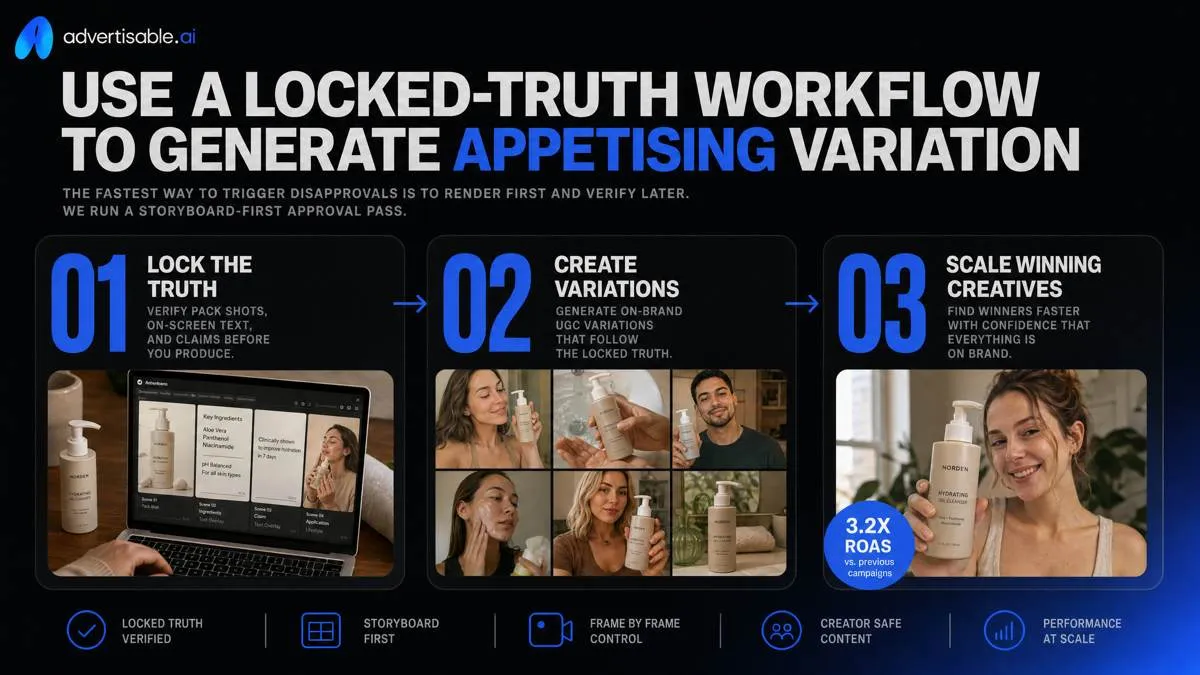
The fastest way to trigger disapprovals is to render first and verify later. We run a storyboard-first approval pass so you can check pack shots, on-screen text, and claim language before you spend time generating full variations.
When something is off, fix it at the smallest unit of work. Frame-by-frame control lets you correct one label frame, one ingredient callout, or one disclaimer moment without touching the rest of the ad.
Then export channel-native versions so you are not introducing new errors in resizing. Build and QA deliverables per placement for Meta, TikTok, and YouTube instead of shipping a single master crop.
Import your product URL first
Start from the product page, not a prompt. Product URL import is the control point that prevents label and claim drift because it anchors the creative to the same source your reviewers and customers can verify.
In Advertisable AI Studio, importing the URL is where we pull in real packaging so the bottle, box, marks, and label layout do not get reinterpreted across outputs. It also lets you source ingredients and on-page claims from the listing, which is the fastest way to keep your scripts and overlays aligned with what you actually sell.
You also want variant mapping from the page so your ad generator understands what is changing (flavor, size, bundle) and what must stay constant (brand marks, base claims). That avoids a common failure mode where a “strawberry” visual shows up on a “vanilla” SKU, or a bundle price is implied on a single unit.
- Acceptance criteria before you generate: packaging matches the page (shape, cap, label layout), ingredient callouts match the ingredient panel, and every on-screen claim appears verbatim on the product page or your approved claim list
- Variant map fields to confirm: SKU name, flavor/format, pack size, and any variant-specific claim or disclaimer text
- QA spot check: review 3 frames where the pack is most visible (typically hook, proof, offer) and compare them against the product page side-by-side
Lock Brand DNA before scaling
Lock Brand DNA before you scale variations. The goal is simple: every regenerated version can change the test variable, but it cannot invent new language, new styling, or new claims that get flagged in review.
Treat approved phrases and tone as non-negotiables. For supplements, keep structure/function language locked and avoid anything that reads like a disease claim since platforms and reviewers scrutinize that category closely under FDA labeling regulations.
Colour and font fidelity are not design nitpicks, they are compliance controls. Small shifts in typography, contrast, or brand color can make a disclaimer unreadable or make your pack shot look like a different product.
A blocked terms list is your final brake. It stops the model from substituting “cures,” “treats,” “clinically proven,” or any other unapproved words that cause disapprovals even when the rest of the ad looks fine.
- Brand DNA checklist: approved claim phrases, required disclaimers, brand voice notes (what you say and what you never say)
- Visual guardrails: hex color targets, primary font family, and minimum on-screen text size you consider legible on mobile
- Blocked terms: disease language, exaggerated superlatives, and any ingredient or certification you do not explicitly carry on-pack or on-page
Regenerate only the hook scenes
Run 5 to 10 single-variable tests by regenerating only the hook scenes. You keep the pack shot, proof, and offer scenes locked so the only thing moving is the first 1 to 2 seconds that determines whether someone keeps watching.
Scene-level control saves both time and rework because you are not re-rendering the entire timeline to test one opening line or one visual beat. When a version fails QA due to one frame of label drift, you repair that scene or frame, not the whole ad.
Read results on a 48 to 72 hour window per batch. That is typically enough to see early signals on hold rate and click intent, then decide what to do next: double down on the winning hook pattern, or swap a single hook element while holding everything else constant.
- Single-variable hook options: first line, first visual (pack vs usage), on-screen headline, or opening problem statement (pick one per batch)
- Hold constant: packaging frames, ingredient/claim overlays, disclaimers, and offer framing so performance differences attribute to the hook
- Next-test decision rule after 48 to 72 hours: keep the best-performing hook structure, regenerate 5 more hooks within that structure, and only then consider changing proof or offer scenes
Keep food claims honest with a lightweight guardrail system
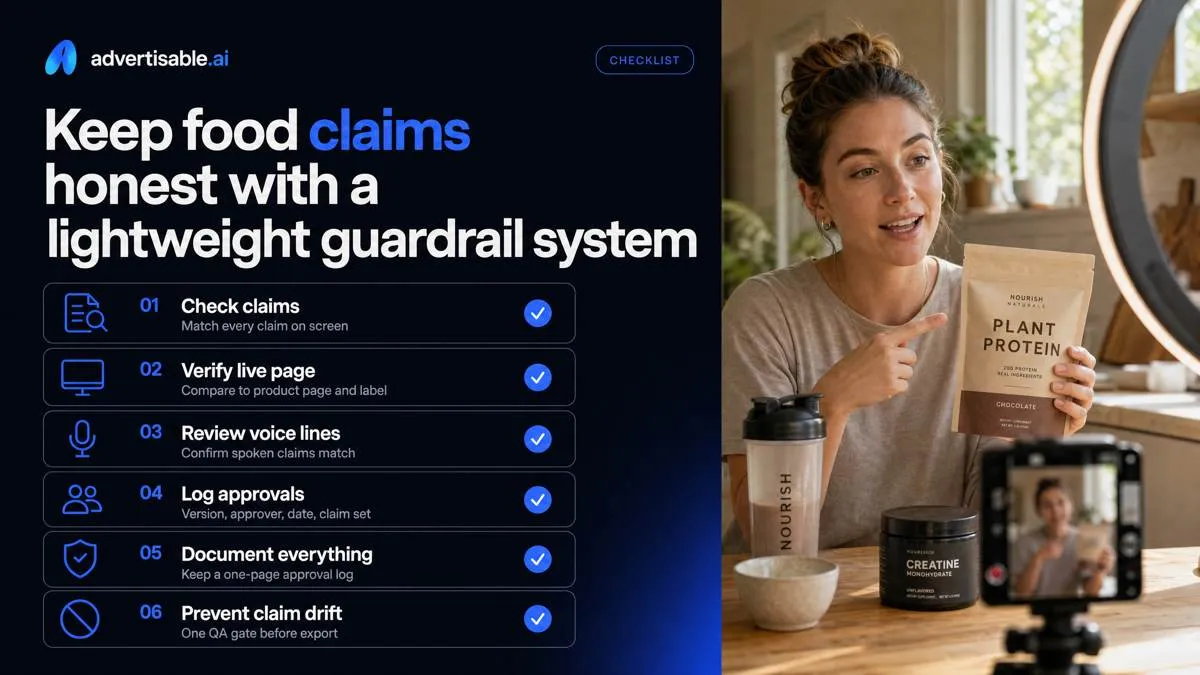
Claim drift is one of the fastest paths to ad disapprovals because your ad says one thing while your product page and label say another. Put a simple QA gate in front of every batch: before you export, check on-screen text and voice lines against the live product page for that SKU.
For paid social, require documented approvals, not “looks fine” in Slack. We keep a one-page approval log per batch (version, date, approver, approved claim set) so you can answer platform questions and prevent a winning concept from slowly mutating across iterations.
Define your approved claim set
Your approved claim set is a short list of phrases the team is allowed to use, and everything else is blocked. This is how you stop “healthy”, “clean”, and “natural” from creeping into scripts and triggering review issues when you scale from 5 to 50 variations.
Set boundaries in writing so every new hook is a controlled rewrite, not a new promise. For example, “tastes light” is a taste claim. “Light and healthy” is a health framing shift, and it should require a separate approval path.
Organic is another common drift point. Only use “organic” when your packaging and product page support it, and keep qualifiers exact (what is organic, certified vs made with, and which ingredients).
- Allowed: taste and sensory phrasing (sweet, crunchy, less bitter, chef-made, kid-approved)
- Restricted without explicit approval: natural, healthy, clean, detox, guilt-free, “better for you”
- Organic controls: only as labeled, with the same qualifiers as your site and packaging
- Scene-level rule: health-adjacent phrasing cannot appear in hook text unless it is in the approved set
Treat nutrition as a hard fact
Nutrition is not creative copy. Macros, calories, and ingredients must match the label and your product page, or you are effectively publishing conflicting product specs.
We recommend acceptance criteria that are binary: pass or fail. When you generate variants, keep the serving size language identical across scenes. A “per serving” claim in one cut and “per container” in another is an easy way to create accidental misrepresentation.
Avoid implied medical outcomes, even when you do not name a disease. FDA labeling regulations separate health claims from other claim types, and platforms routinely treat “helps lower”, “treats”, or “prevents” language as a review trigger in food and supplement categories.
Operationally, this is where Advertisable AI Studio helps: lock approved claims in Brand DNA, then QA each rendered batch against the product URL import so the model cannot freestyle new numbers or outcomes.
- Macros: calories, protein, carbs, fat, sugar, fiber match label exactly
- Serving size: same unit and quantity everywhere (g, scoops, bars, cans)
- No medical implication: remove treat, cure, prevent, reduce risk, lower blood pressure, anti-inflammatory, “clinically proven to” unless you have approved substantiation and wording
- Batch QA step: any mismatch means regenerate only the affected scene, do not ship the batch
Ship AI food ads without visual drift or claim blowback
If you are going to use AI for food ads, your first job is control. We built Advertisable AI Studio for exactly that workflow, so you can scale variation without letting the model invent packaging, ingredients, or wording that never existed.
Start with your product URL import. Then lock your Brand DNA so packaging, label text, ingredients, and approved claims stay fixed. Build the storyboard first, then run a fast QA against your product page before you render anything.
Now test like an operator. Generate 5 to 10 single-variable hook variations by regenerating only the hook scene. Hold proof and offer constant.
Export channel-ready formats for Meta, TikTok, and YouTube. Run a 48 to 72 hour readout, pick winners, and only change the scene that failed.
Frequently Asked Questions
### Is AI advertising illegal?
It depends on what you claim and how you represent the product. Your safest operational approach is to treat label facts and nutrition as non-negotiables, lock approved claim language, and QA every variation against your product page before you ship.
### How is Advertisable AI different from HeyGen or general AI video tools?
Advertisable AI Studio is built for performance product ads, not presenter-style videos. We start from your product URL, lock Brand DNA guardrails, and give you scene-level and frame-by-frame control so you can iterate without introducing packaging or claim drift.
### How do I know if my repurposed ad is truly native or just cropped?
Do a one-second readability check per placement. If the hook text is not legible immediately or key framing is lost in 9:16 or 16:9, rebuild the hook natively and export channel-ready versions instead of cropping a single master.