15 Best AI tools for Meta ad creative output 2026
The best AI tools for Meta ad creative in 2026 are the ones that maximize publishable output rate: how many Meta-ready variants you can actually ship without manual fixes.
We built Advertisable AI for this exact Meta constraint: you need more variants per week, but you need control more. Our workflow starts from a product URL, extracts and locks Brand DNA guardrails, routes you through a Storyboard Editor, then lets you regenerate only the failing scene or even edit frame-by-frame before exporting in platform-ready formats.
Before you pick from the 15 tools, you need a selection method that matches your bottleneck and sets acceptance criteria for “publishable.” Next, we will define publishable output rate and the workflow checks that separate usable Meta creative from fast drafts.
How do you pick an AI creative tool for Meta in 2026?
Pick based on publishable output rate: the percent of variants you can export and launch without human rework for specs, claims, or brand drift. Your real bottleneck is usually one of four things: hooks (first 2 seconds), UGC-style presenter footage, static volume, or fixing and QA. Throughput is not generation speed; it is generate plus fix plus QA plus export, because every full re-render loop multiplies subscriptions and operator time.
Use the table above to match the tool to your bottleneck, then demand scene-level edits, guardrails, and Meta-ready exports.
1. Advertisable AI
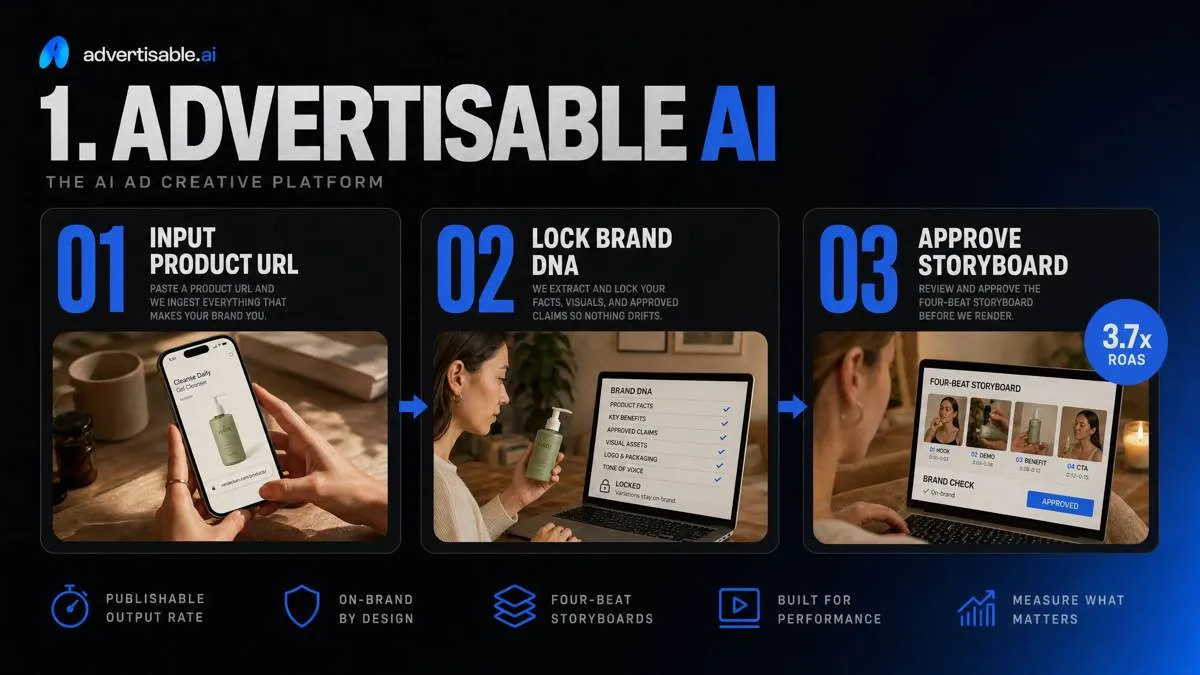
Advertisable AI is built for publishable output rate, not raw render speed. You start with a product URL, then the platform extracts and locks Brand DNA (product facts, visuals, approved claims) so variants do not drift off-brand or introduce spec-breaking text. Instead of arguing over finished videos, you approve the four-beat storyboard in the Storyboard Editor before rendering.
When you run hook tests, you regenerate only scene 1 (the first 2 seconds) while holding product moment, proof, and CTA constant, then export Meta-ready formats without manual resizing.
2. Pencil
Pencil is oriented around ad-specific generation: you can produce static images, video ads, ad copy, and AI voiceovers, then push to multiple ad platforms (including Facebook and TikTok) without treating ads as generic content. It is a strong fit for rapid concept exploration because the floor is low: the Core plan starts at $14 per month for 50 generations, and the guided free trial lets you create up to 6 ads.
Operator check: watch how it handles iteration under real approvals. If your workflow needs storyboard-first signoff, strict brand guardrails, and scene-level regeneration to avoid full re-renders, validate those controls early before you commit to high-volume testing.
3. AdCreative.ai
AdCreative.ai is a strong fit when your bottleneck is sheer static volume for Meta: you need dozens of image variants fast, not another round of video renders. Its predicted performance scoring is useful as a triage layer, so you can test the top-ranked creatives first instead of guessing which layouts and headlines deserve spend. Watch the credit economics: pricing starts at $39/month for 20 download credits, and credits are consumed only when you download a creative, so keep rough drafts un-downloaded and pull credits only for assets you will actually traffic.
4. Runway
Runway is a better fit when your bottleneck is editing control, not generating yet another ad draft. It combines video editing with AI generation, so you can create, transform, and then refine footage in one place. The differentiator is revision precision: frame-level controls let you fix the exact moment that breaks review (a bad transition, warped product shot, or timing issue) instead of re-rendering the whole cut.
It shines when editing is the work.
5. Wireflow
Wireflow fits workflow-driven orgs that treat creative as a repeatable pipeline, not a one-off project. You build the process on a node-based workflow canvas, reuse the same “recipe” across briefs, and keep the discipline tight: batch runs with locked inputs so you only change one variable at a time.
The operational win is comparability. You run the batch, then commit to 48-72 hour standardized readouts before making decisions, so teams stop debating mixed-variable noise and start shipping the next clean iteration.
6. Synthesia
Synthesia is the tool you pick when the constraint is human trust on camera. You get realistic AI actors delivering a clean, scripted read, which works for B2B and regulated categories where a “real person explaining the value” outperforms kinetic edits.
The strongest format is script-to-video testimonial style: founder update, expert explainer, or customer-style case study where the proof points are tightly controlled in the script.
Language coverage is a core advantage. Synthesia supports 80+ languages, and Wikipedia's Synthesia entry) notes enhanced dubbing to translate video in 30 languages with naturalized lip-syncing.
7. Hour One
Hour One is the pick when you need photoreal presenters that read as corporate video, not stylized avatar content. It is built for personalization at scale, where the same script skeleton ships in many variants without looking like a template: think SDR outreach videos, regional intros, or account-specific name and industry inserts for retargeting sequences.
Operationally, we judge it on production value and publishability: stable lip-sync, consistent lighting, and a presenter that holds up under brand review. Hour One also offers a free trial with 3 minutes of video creation per month, which is enough to validate your presenter fit before you commit.
8. D-ID
D-ID is the lightweight path when you need speed to first draft: turn a still image into a talking-head video by pairing it with a voice track. The output is typically lip-sync testimonial style, which makes it useful for founder statements, quick case-study reads, or UGC-like proof snippets without a full shoot.
Where it fits operationally is rapid script iteration. Credits are consumed per 15-second video blocks, so you can cycle hooks and first lines fast, then keep only the versions that meet your publishable output rate.
9. Copy.ai
Copy.ai helps when your bottleneck is scripting, not rendering. You take fixed video assets (the same product moment and proof visuals) and generate fast hook and CTA variations to raise your testing velocity without touching the edit.
Use it to run clean single-variable copy tests: keep footage, offer framing, and CTA card design constant, and swap only the first two seconds of on-screen hook text or the final line of CTA. With Copy.ai’s pricing starting at $29 per month for 5 seats, it is a straightforward way to produce disciplined copy packs for Meta.
10. Smartly.io
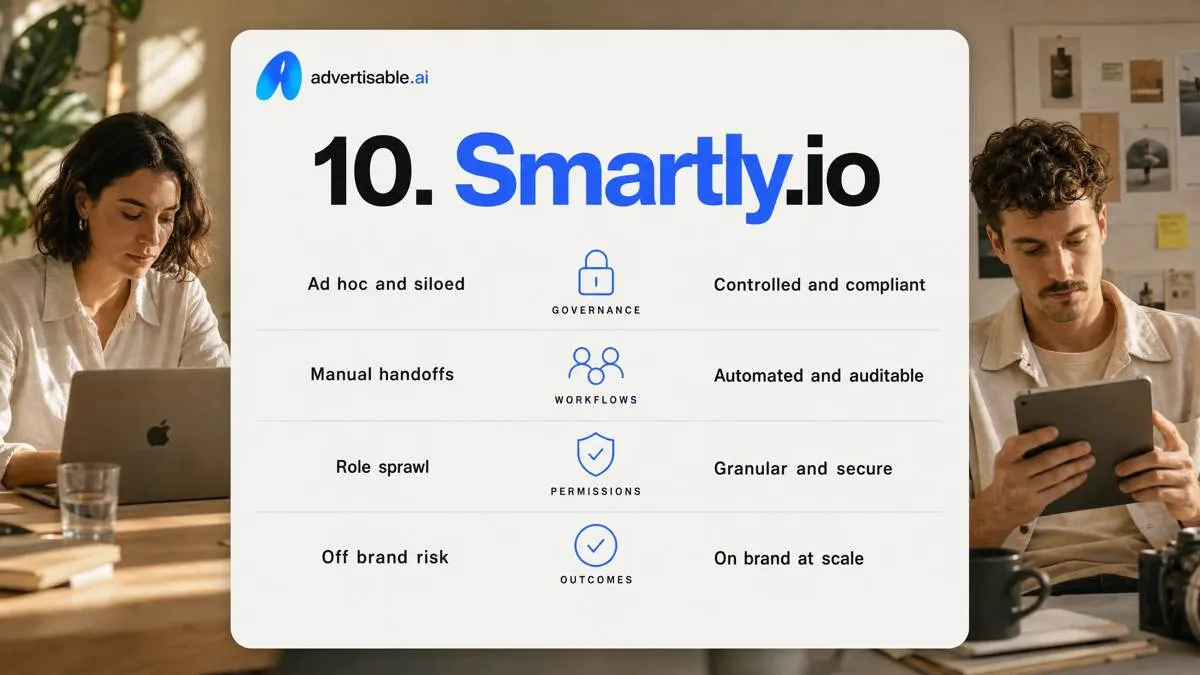
Smartly.io is for teams where the real bottleneck is governance, not generation. If you are worried about “another tool” that adds QA and subscriptions, this is the opposite posture: it is built around controlled workflows, permissions, and integrations so creative and media changes do not turn into off-brand drift or spec rejects.
At enterprise scale, you are optimizing publishable output rate across handoffs: creative ops to media ops to analytics. Smartly.io earns its keep when you need standardized templates, approval gates, and repeatable trafficking across channels, not ad-hoc exporting.
It is best when many people touch the work: clear ownership, version control, and auditability reduce back-and-forth, and custom pricing typically starts around $4,000 to $5,000 per month or 2% to 4% of media spend.
11. Madgicx
Madgicx sits in the optimization-first category: a Meta-focused platform that helps you adjust budgets, audiences, and delivery while surfacing creative insights. It is useful when you need a tight performance feedback loop, because it can turn 48 to 72 hour readouts into concrete next actions on what to scale, pause, or iterate. The mistake is expecting it to be a primary creative generator.
You will still need a separate production system to create new hooks, cut variants, and ship Meta-ready exports at volume.
12. Revealbot
Revealbot is rules-based automation for bid and budget ops, not a creative generator. When your bottleneck is consistent optimization actions, rules can beat “smart suggestions” because they execute the same way every time and do not get distracted by new assets. You use it to standardize guardrails like pausing losers and scaling winners on thresholds you define.
It will not increase creative throughput or fix off-brand drift, so treat it as a separate layer from your creative production system.
13. Trapica
Trapica is an AI optimization platform, not a creative production studio. You use it when your bottleneck is account-level efficiency: audience targeting decisions, budget allocation, and cross-network optimization, typically priced as custom terms reported around 2-4% of ad spend. That makes it a fit for teams managing meaningful spend across many accounts or channels, where small percentage lifts matter.
It is not built for variant rendering, storyboard-first approvals, or scene-level regeneration. If your problem is shipping more Meta-ready creative without re-render loops, Trapica sits downstream from the tool that actually produces the ads.
14. Adzooma
Adzooma is a PPC management tool, not a creative production system. It is built to help you monitor and optimize across Google Ads, Microsoft Advertising, and Meta Ads, with a Free plan plus paid tiers at $69 per month (Silver) and $179 per month (Gold).
For lean ops, the value is operational control: reporting, scans, and a consistent place to review changes and opportunities without living in three UIs.
What it will not fix is creative fatigue. You still need a separate workflow to generate new hooks, iterate formats, and keep publishable output rate high.
15. Loom
Loom is a capture tool, not an AI ad generator. You use it to record your screen and camera at the same time, which makes it a reliable way to get real product walkthroughs, founder explainers, and UI demos into your creative pipeline.
Treat Loom recordings as repurposeable source footage: you can clip hooks, grab proof moments, and reuse clean product shots across variants. The constraint is important: what you record is rarely publish-ready for Meta without edits, QA, and format work. Loom feeds your generator and editor, it does not replace them.
Which tool should you trial first if you need Meta-ready output fast?
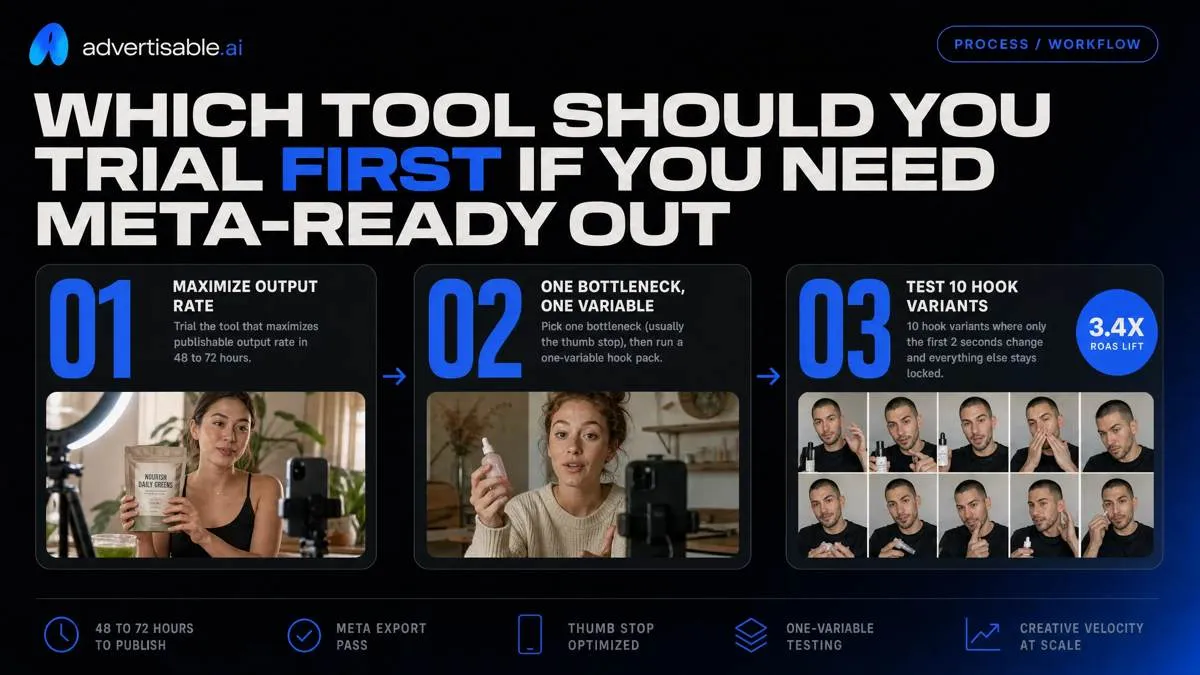
Trial the tool that maximizes publishable output rate in 48 to 72 hours, not the tool that generates the most drafts. Pick one bottleneck (usually the thumb stop), then run a one-variable hook pack: 10 hook variants where only the first 2 seconds change and everything else stays locked.
Your acceptance criteria is binary: does it pass Meta export without fixes and does QA approve it as on-brand. Before you publish, run export checks for 9:16 output and verify text and key visuals stay inside safe zones.
With Advertisable AI, start from the product URL, review and lock Brand DNA guardrails, generate the 10-variant hook pack, then only regenerate the failing hook scene and re-export.
Trial the workflow that protects publishable output rate
You do not need more variants. You need more Meta-ready variants that ship without hours of fixes.
If you want to pressure test a tool fast, run a controlled hook pack. Paste a product URL into Advertisable AI, let our Brand DNA extractor pull the facts and guardrails, then lock it. Generate 10 Meta Reels style video variants where only the hook changes.
Keep the product moment, proof element, and CTA constant.
Before you render, use storyboard-first approval in the Storyboard Editor. After you launch, take a clean 48 to 72 hour readout. If the batch underperforms, regenerate only the hook scene using scene-level regeneration, re-export in 9:16, and run the next one-variable batch.
Frequently Asked Questions
What is the difference between publishable output rate and generation speed?
Generation speed is how quickly you can render variants. Publishable output rate is how many of those variants you can ship to Meta without rework, including claim fixes, brand corrections, and spec QA. If you want true throughput, measure outputs shipped per week, not outputs generated per hour.
Why do I need scene-level editing if I can just regenerate the whole video?
Because most performance iteration is a single weak beat, usually the first 2 seconds. Scene-level regeneration lets you swap the hook while holding the product moment, proof, and CTA constant, which keeps approvals tight and attribution clean. Full re-renders waste time and introduce untracked changes.
How do I know if a tool is right for my workflow if I have never used AI creative tools before?
Start by naming your bottleneck, then trial the smallest workflow that proves publishable output rate. For Meta video testing, that is a 10-variant hook pack with Brand DNA locked, storyboard approved, and a fixed 48 to 72 hour readout window. If the tool cannot hold constants and only change one variable, you will keep buying speed and getting churn.