Recreate a Viral Video With AI: Rebuild the Structure, Not the Footage
To recreate a viral video with AI using your brand assets, you do not copy the footage. You rebuild the viral structure, then swap in your product moments, script, and brand constraints so every scene stays accurate.
You are right to be skeptical. A “viral template” that ignores your niche, your offer, and your product details will burn time and credits, and it still will not look like something you can run as paid social. What works is a controllable workflow that lets you:
- Extract the hook, beats, pacing, and payoff sequence that made the reference work.
- Keep that DNA, but change the angle, claims, and visuals so it fits your category.
- Lock down brand consistency so the AI does not invent product details.
- Fix one weak scene without regenerating the entire video.
- Spin one winner into multiple two-second hook variations for TikTok and Meta before the window closes.
We built Advertisable to do exactly this with AI UGC: paste a product URL, get an auto-generated storyboard, and use scene-level control plus brand-consistency guardrails to keep your product representation tight. You are not stitching tools together. You are making deliberate, editable choices at the scene level.
Before you touch prompts or avatars, you need to get clear on what you are actually recreating from that viral video, because it is almost never the visuals.
It is the hook, the sequence of beats, the pacing, and the payoff that held attention and earned the click.
What are you really recreating from a viral video?
You are not recreating someone else’s footage. You are recreating the retention mechanics that made the video travel: the hook that earns the first seconds, the sequence of beats that keeps attention, and the payoff that makes the ending feel inevitable.
Hook, beats, pacing, payoff
A viral video is usually a tight, repeatable sequence, not a lucky moment. When you recreate it, you are rebuilding the order and timing of how information is revealed so the viewer keeps saying “one more second.”
In performance terms, the structure is what protects you from wasting impressions. The two-second hook earns permission to continue, the beats reset attention before it drops, pacing controls how fast the viewer gets new information, and the payoff resolves the tension you created upfront.
What we look for when we reverse-engineer a viral clip is not the topic. It is the choreography of attention: when the first claim lands, when the first visual switch happens, when the product moment shows up, and how quickly the video “proves” what it promised.
- Hook: a specific promise or disruption in the first seconds (problem, outcome, or surprising contrast)
- Beat 1: context in one sentence or one shot so the viewer is oriented fast
- Beat 2: proof or demonstration that reduces skepticism (show, do not explain)
- Beat 3: escalation (a constraint, a comparison, or a “here’s what changed” moment)
- Payoff: the result, reveal, or final proof that matches the hook’s promise
- Close: a clean next action or implication that feels earned, not tacked on
Same DNA, new niche angles
You want the same DNA, but with surface elements swapped to match your niche, your buyer, and your product reality. That is how you keep what works while making it feel native to your audience instead of like a recycled trend.
The easiest way to think about it is: keep the sequence, change the inputs. Your inputs are the pain point, the language your customer uses, the objections you need to neutralize, and the product moment that proves your claim.
In practice, that often means rewriting only a few lines of the script and changing what “proof” looks like. A skincare brand proves with texture and before-after framing. A SaaS brand proves with a fast screen outcome and a specific constraint removed.
The structure stays intact, the proof asset changes.
- Swap the hook angle, not the hook role: “stop doing X” becomes “stop paying for Y” or “stop guessing at Z”
- Replace the proof: demo, testimonial-style claim, comparison, or “here’s the exact output” moment
- Match pacing to your category: faster cuts for impulse buys, slightly more breathing room for higher-consideration offers
- Move the product moment earlier if trust is the bottleneck, later if curiosity is the bottleneck
Reference vs. copying
Referencing a viral video means borrowing the structure and retention logic. Copying means lifting protected expression: the same script lines, the same distinctive sequence of jokes, the same voiceover phrasing, or a near-identical scene flow that substitutes for the original.
A practical test: if your version could confuse a viewer into thinking it is from the same creator or brand, you are too close. You should be able to describe what you borrowed in one sentence as a “format” (hook type, beat order, pacing), not as “we used their exact lines and scenes.”
The U.S. Copyright Office guidance frames fair use around whether your work is transformative: it adds a further purpose or different character and does not substitute for the original. Keep in mind that commercial use like advertising weighs against fair use, so transforming the structure helps but does not guarantee protection. Generally, the lower-risk path is to keep the structure but make your creative decisions clearly your own: new script, new product moment, new on-screen text, new angle, and brand-specific claims you can support.
- Lower-risk: replicate the beat map and timing while changing wording, visuals, and proof
- Higher-risk: reusing distinctive phrasing, punchlines, or a creator's recognizable narrative device line-for-line
- Higher-risk: mirroring the same sequence of scenes so closely that only the product swap changes
- Lower-risk: keep the "role" of each scene, but redesign the scenes for your category and buyer objections
How do you recreate a viral video with AI without losing brand control?
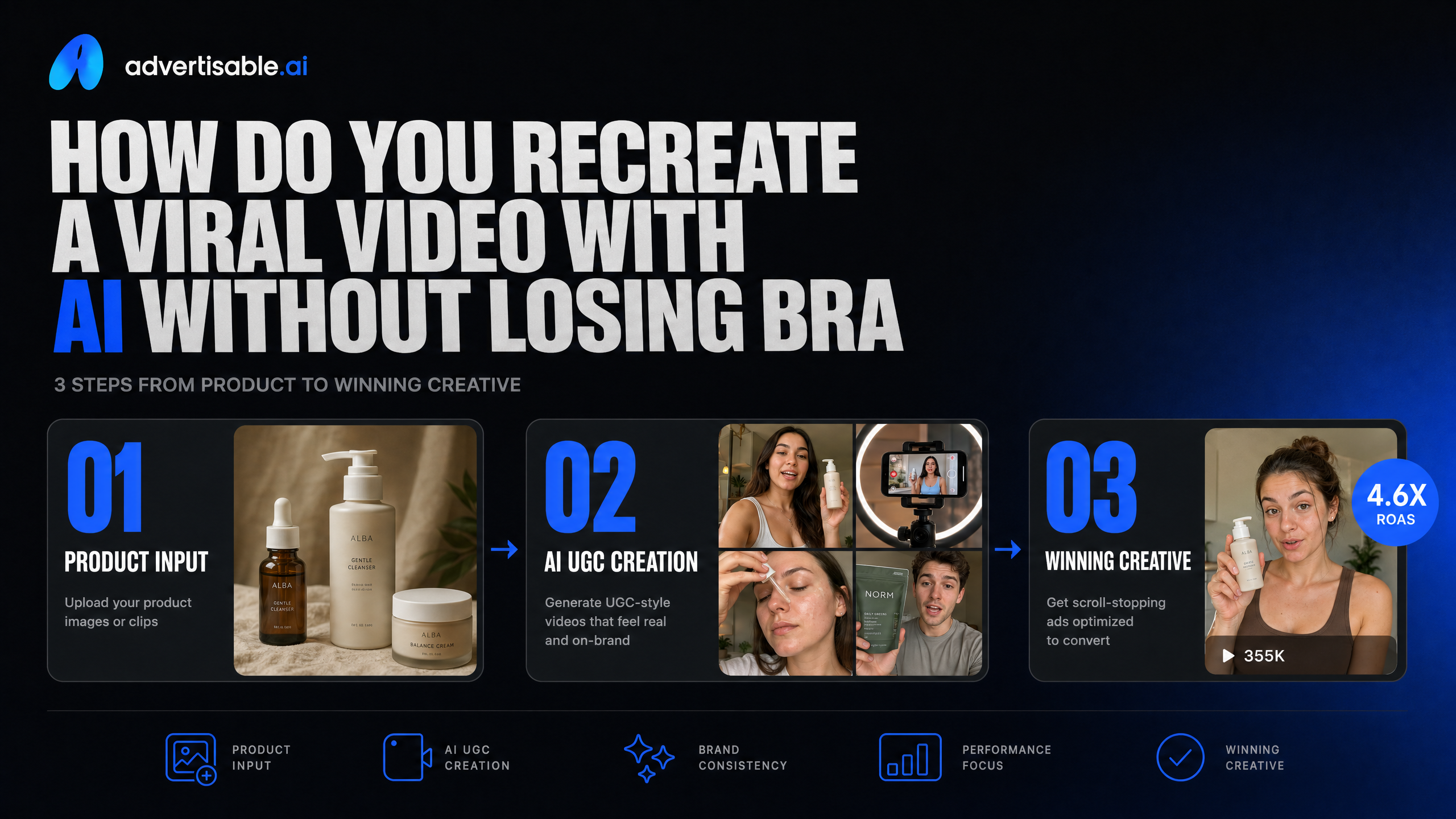
Turn a Reference Into a Storyboard
Brand control starts the moment you convert the reference into editable scenes, not when you render the final video. A storyboard forces the viral video to become a set of decisions you can approve or reject.
Use the reference as a structural blueprint: identify the hook, the sequence of beats, and where the product moment lands. Then translate that into a storyboard where each scene has one job (stop the scroll, prove the claim, show the product, handle objections, deliver the CTA).
In our experience, the fastest way to keep accuracy is to anchor the storyboard to your product truth early. When the product moment is delayed, AI outputs tend to drift into visuals and claims you would never ship, and you end up reworking the whole piece.
- Scene 1 (0-2s): Hook pattern (the exact trigger that earns attention, not your brand story)
- Scene 2: Problem setup (what the viewer is frustrated by, stated in their words)
- Scene 3: Mechanism or proof (the visual that makes the claim feel real)
- Scene 4: Product moment (clear, accurate depiction of what it is and how it’s used)
- Scene 5: Result or transformation (what changes after using it, without overpromising)
- Scene 6: CTA (one action, one reason, minimal extra text)
Swap Surface Details, Keep the Beats
You do not want to copy someone else’s creative; you want to keep the retention mechanics while changing everything that makes it theirs. That means the beats stay, but the wrapper becomes unmistakably your brand and your product.
Surface details are the parts viewers notice first: the persona, setting, props, on-screen text style, and the product itself. The beats are the invisible structure: the two-second hook type, the pacing of cuts, when proof shows up, and the order objections get handled.
A practical way to stay on the right side of “recreate” is to treat the reference like a template for timing, not content. You can keep the same rhythm (hook, proof, product, payoff), while swapping in your own script, claims, and product moments so the ad stands on its own.
- Keep: hook category (challenge, surprising result, fast demo), cut frequency, and beat order
- Swap: creator look and voice, background and wardrobe, brand colors and typography, product shots and packaging, on-screen claims, and CTA language
- Tighten: any beat that does not support your offer (especially extra jokes, lore, or side plots that worked for the original creator but do not sell your product)
When you separate “beats” from “surface,” you can move fast on trends without turning your brand into a copycat or letting the model invent details you cannot support.
Fix Weak Scenes Without Starting Over
You keep brand control by editing at the scene level, not regenerating the entire video every time one moment misses. A single weak scene usually comes from one of three issues: unclear intent, inaccurate product depiction, or pacing that breaks the viewer’s attention.
Treat the storyboard like a modular system. If the hook is strong but the product moment is muddy, you only replace the product scene. If the proof is there but it drags, you shorten that one beat and keep the rest intact.
This is where an ad generation platform with a storyboard and scene editor matters, because you can lock what is working and only iterate what is not. In Advertisable AI, you can generate from a product URL, review the storyboard, and adjust scenes one-by-one with brand-consistency guardrails so your product stays accurate while you iterate quickly.
- Hook underperforming: rewrite only the first line, keep the same visual action so the cut timing stays consistent
- Product looks wrong: move the product moment earlier and specify the exact use-case in the scene description, then regenerate that scene only
- Scene feels flat: change the camera framing and on-screen text density for that scene, not the whole ad
- Story loses momentum: remove one explanatory line and replace it with a visual proof beat (demo, comparison, before-after) in the same slot
Your goal is controlled iteration: preserve the parts that already earn attention, and spend your changes where the ad is actually leaking retention or accuracy.
How does one video become ten variations you can test fast?
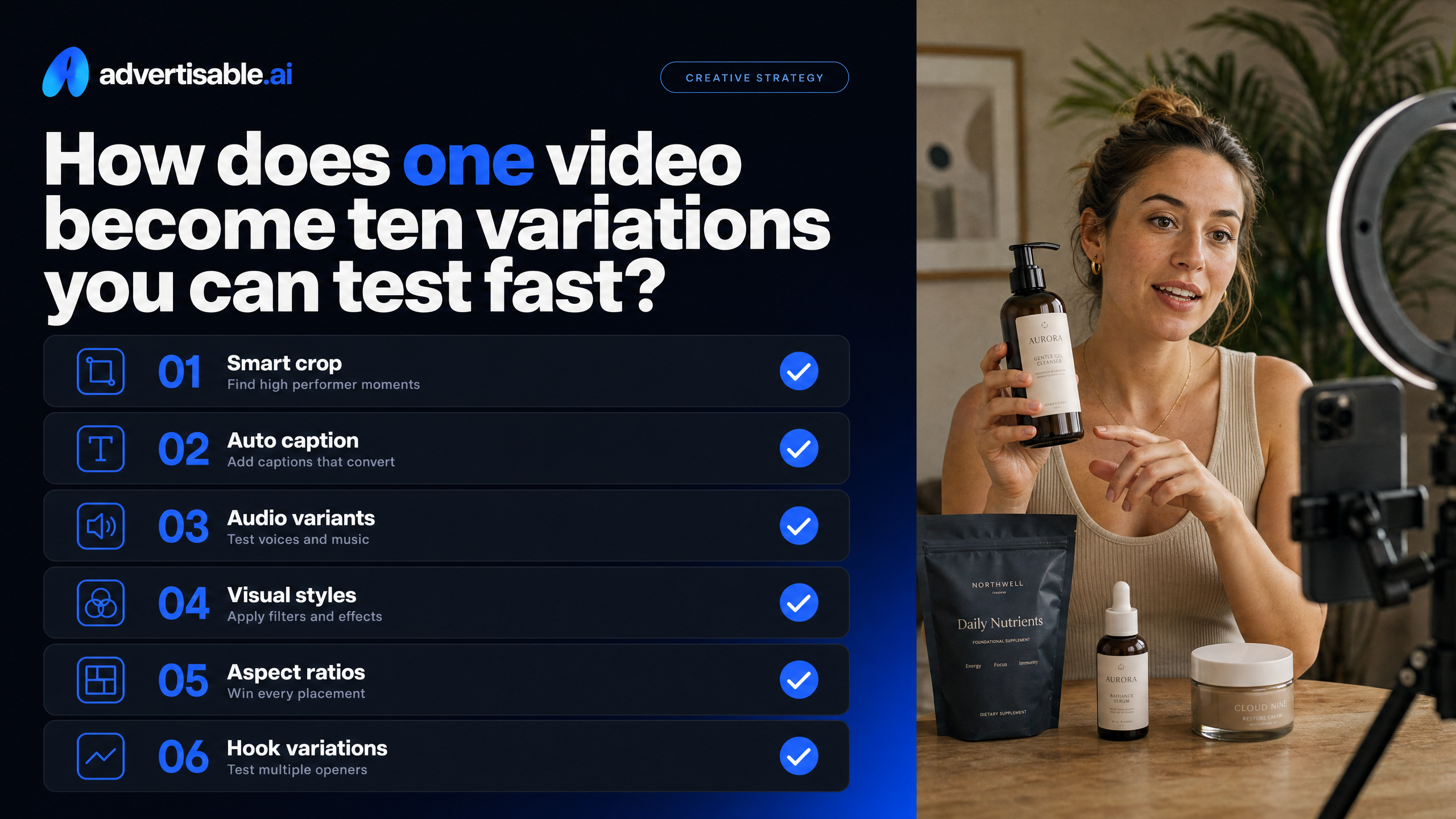
You get to ten testable variations by changing only what the algorithm and the buyer actually react to, while keeping the underlying beat structure intact. Treat the first two seconds, a few high-impact scenes, and the export specs as your three fast dials.
Two-second hook variants that fit
Your fastest path to ten variations is writing 5 to 10 hooks that all fit the same first scene timing. You are not rewriting the whole ad, you are swapping the first 1 to 3 seconds while keeping the rest of the storyboard identical.
We treat hooks as interchangeable “caps” that sit on top of the same sequence: hook, problem, mechanism, proof, offer. That gives you clean A and B comparisons because everything after the hook stays constant.
To decide which hooks are worth keeping, watch early retention and do not overthink it. platform-specific hook metrics matter here: on TikTok, 2-second video views and 6-second video views are the most reliable early signals for hook performance, and on Meta, thumb-stop rate (2-second views divided by impressions) plus video average play time tell you if the opening is doing its job.
- Outcome hook: “I fixed [pain] in 7 days without [common effort].”
- Contrarian hook: “Stop doing [common tactic]. Do this instead.”
- Specific claim hook: “This is the only [category] that does [mechanism].”
- POV hook: “If you’re still dealing with [pain], watch this.”
- Proof-first hook: “Here’s what happened after I switched to [product].”
- Pattern interrupt: a blunt, on-screen statement that forces a re-read (kept under eight words).
When your hooks share the same length and cadence, you can swap them without rebuilding the ad, which is what keeps your testing cycle tight.
Scene swaps to fight creative fatigue
Creative fatigue usually is not “the whole ad is dead.” More often, one or two scenes have become invisible, and your performance drops because your scroll-stopper moments are no longer surprising.
The fix is targeted scene swaps that preserve the proven structure. Keep your hook and your CTA stable for a test round, then rotate only one scene in the middle where attention typically dips, like the first proof moment or the product demonstration.
With an AI UGC workflow, you can do this without refilming: swap the product moment angle, change the b-roll equivalent to a new product use case, or adjust the avatar delivery for a different persona, while your storyboard timing stays consistent. In our experience, brands move faster when they use scene-level control to edit only what is underperforming, instead of regenerating full ads and hoping for luck.
- Replace a talking head scene with a tighter product moment that shows the “how it works” visually.
- Swap the proof beat: testimonial-style line, then a quick before-after visual, then back to the main script.
- Change the objection-handling scene to match a new audience segment (price, time, results, ingredients).
- Rotate the setting or wardrobe to refresh the same message without changing the offer.
- Update on-screen text to mirror the exact phrasing customers use in reviews or support tickets.
Export variants for TikTok and Meta
You do not want one export that is “good enough everywhere.” You want two exports that match how each platform crops, captions, and previews your first seconds, so your hook survives the feed.
TikTok and Meta both reward fast clarity, but they punish different mistakes. TikTok will burn you for slow pacing and weak first-frame readability; Meta will burn you for poor safe-area management and inconsistent audio levels across placements.
Build exports as a small matrix: same creative, different format decisions. In Advertisable AI, we see teams ship faster when they generate the base video once, then output placement-ready variants instead of reworking the storyboard for every channel.
- TikTok: 9:16 vertical, captions sized for mobile, first frame readable with no sound, tighter cuts in the first 6 seconds.
- Meta Reels and Stories: 9:16 vertical with generous safe-area padding (avoid covering text with UI), captions centered, strong first-frame thumbnail.
- Meta Feed: 4:5 option when you want more screen real estate without going fully vertical, plus a version with slightly slower text changes for readability.
- Audio: normalize levels and keep music under the voice so performance does not vary by placement for the wrong reasons.
When exports are tailored to placement, your tests measure creative differences instead of formatting errors.
Recreate a viral video with AI without sacrificing brand control
You do not need to chase the trend and hope it hits. You need to rebuild what made the video work, then ship your version while the window is still open.
That is exactly what we built Advertisable AI for. You bring a reference and your product link, and we turn it into an editable storyboard with AI avatars, Script Input, and scene-level control so you can keep the hook, beats, and pacing while swapping in your product moments and your angle. Brand-Consistency Guardrails help you stay accurate and on-brand as you iterate.
If you want one proven structure to become multiple testable variations, start with the $5 trial. Build your Brand DNA from your URL, generate two hook options, and launch the split test.
Frequently Asked Questions
Q: What is AI UGC and how is it different from real UGC?
A: AI UGC is UGC-style ad creative generated with AI instead of filmed with human creators. You still get the direct, performance-first delivery that works on TikTok and Meta, but you can produce it faster and with more repeatability. The real advantage is volume and iteration, so you can keep the winning structure and test new angles without restarting production every time.
Q: What does scene-level control do?
A: Scene-level control lets you review and adjust the ad scene by scene, instead of accepting a single all-or-nothing output. That means you can fix a weak line, tighten a product moment, or swap a visual while keeping the same hook, beats, and pacing. It is how you move fast without letting your creative drift off-brand.
Q: Can I really make ads without filming anything?
A: Yes. You can input your product URL and your script, then generate UGC-style ads using AI avatars and an auto-generated storyboard. You review and refine the scenes in the Scene Editor so the product moments and claims stay accurate.
From there, you can export platform-ready variations for testing without setting up a shoot or hiring creators.