Frame-by-Frame Control: Fix One Bad Scene, Not the Whole Ad
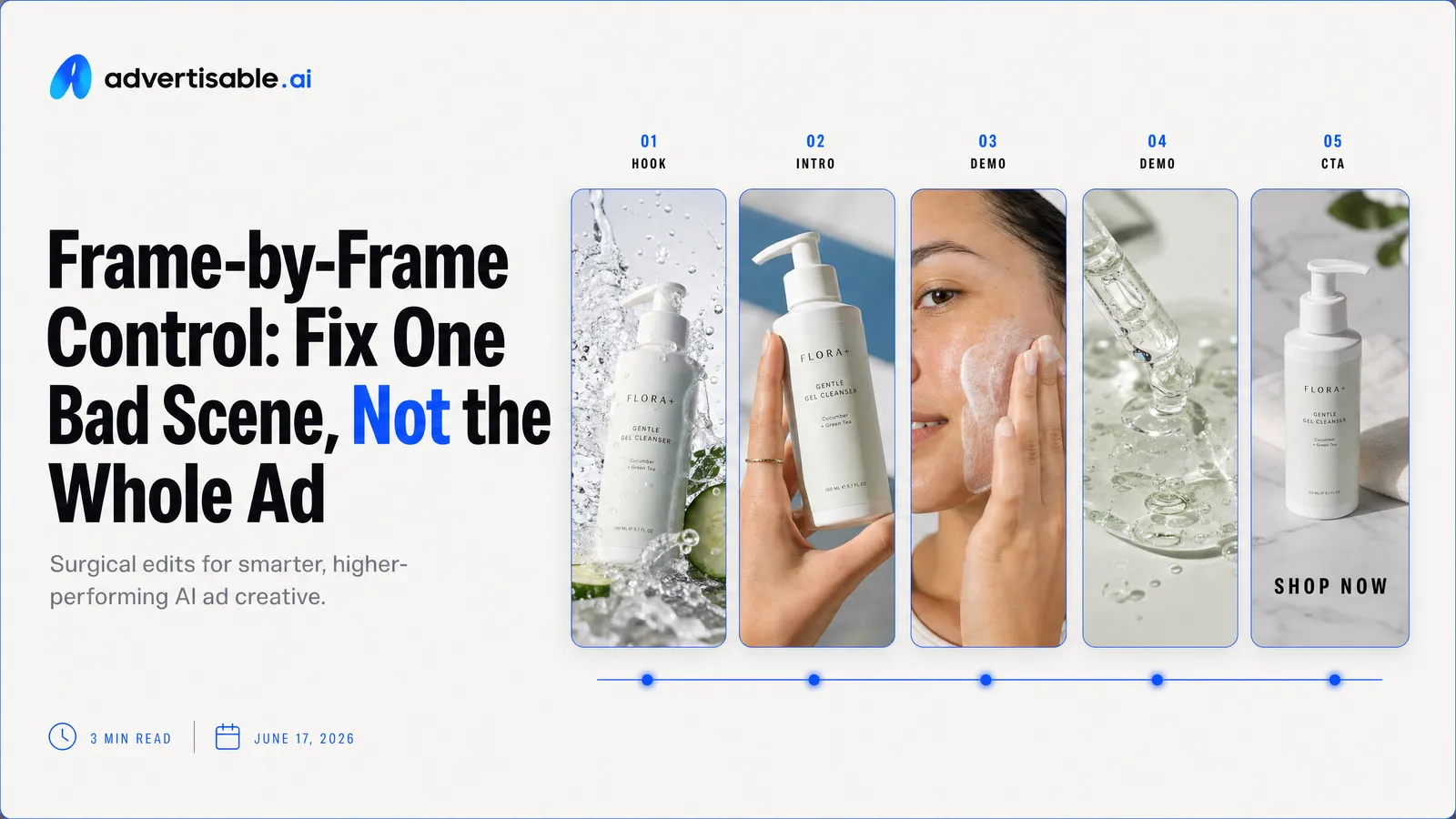
Yes, you can regenerate a single scene frame-by-frame without redoing the whole video, as long as you are using true scene-level control. The right setup lets you lock the scenes that already work, regenerate only the one that missed, and keep your pacing, product shots, and structure intact.
If you are mid-production, you already know the pain: one awkward hook, one off-brand product moment, or one scene that drifts, and suddenly you are tempted to reroll the entire ad and lose what was finally right. We will break down what frame-by-frame control actually means in an AI ad workflow, how per-scene regeneration works on a scene-by-scene storyboard, and where timeline finishing still belongs after you have the right scenes locked. You will also see why the real metric is cost per shippable variation, not cost per render, and how single-variable batches make Hook A-B testing fast instead of chaotic.
At Advertisable AI, we built frame-by-frame control for performance teams who need iteration velocity without brand drift. Our Storyboard Editor, Scene Regeneration Engine, and Brand DNA Locking System are designed so you can fix the one broken scene, run a QA gate, and ship production-ready variations on a 48-72 hour testing loop without wasting credits on full rerenders.
Start by getting clear on what frame-by-frame control means in practice: keeping your good scenes locked, regenerating one scene on demand, and using the scene-level editor to swap only what is underperforming.
Frame-by-frame control means fixing one scene
Locked scenes beat full rerolls
Frame-by-frame control matters because you should not have to reroll an entire ad to fix one missed moment. When you can lock the scenes that already work, you keep pacing, structure, and any approved product beats intact while you repair the one problem area.
Rerolled videos feel fast until you do performance work. Every full regeneration re-randomizes everything, so you lose the hook you liked, the product shot that was accurate, or the CTA timing that matched your landing page. You also end up QAing the whole video again because a single change can introduce new errors elsewhere.
Locked scenes turn iteration into a controlled edit, not a gamble. In practice, you approve what is already shippable, then only regenerate the scene that is off-brief or underperforming.
- Full reroll: one fix forces a complete re-render, and you re-review every scene
- Locked scenes: you preserve approved scenes and only change the scene that missed
- Testing impact: locking lets you isolate what changed, so readouts are easier to trust
Regenerate per scene from a storyboard
Per-scene regeneration works best when your video is built as a scene-by-scene storyboard, not as one continuous output. Each scene has a job (hook, problem, proof, product moment, CTA), so you can replace one block without touching the rest.
The workflow is straightforward: you generate against an approved storyboard, then identify the single scene that is failing and regenerate only that scene. This is also how you keep single-variable testing clean, like Hook A/B where the body and CTA stay identical.
You get two operational wins: faster creative velocity and cleaner learning. Instead of guessing which change improved results, you know exactly which scene was swapped.
- Fix a weak hook without disturbing the product demo and CTA
- Swap one proof scene that drifted off-brand while keeping everything else locked
- Create multiple hook variants against the same downstream scenes for controlled tests
Timeline finishing still has a role
Timeline finishing still fits, but it comes after scene iteration, not instead of it. Scene-level control is how you get the content right; timeline finishing is how you polish and ship it.
Use finishing for practical export tasks that do not change the creative meaning of scenes. Once you start trying to “fix” a broken scene with trims and timing hacks, you are usually masking a content problem that should be regenerated at the scene level.
- Captions and on-screen text timing
- Minor trims for pacing and platform constraints
- Audio level tweaks and channel-ready exports
Single-scene regeneration lowers cost per shippable
Why credits disappear in full rerenders
Full rerenders burn credits because you are paying again for scenes that were already good enough to ship. One missed beat in the hook, one off-brand product shot, one awkward line read, and the whole video gets regenerated anyway.
In practice, full rerenders force you into a reset: new randomization, new scene outcomes, and a new QA pass across every frame. That is where budgets evaporate, not because a single generation is expensive, but because you keep re-buying the same “approved” work.
This is exactly what iteration cost analysis is pointing at: if your average prompt needs 3 generations to produce a keeper, your effective cost per usable video is 3x the listed price.
A simple cost per shippable variation formula
Cost per render is not the metric that matters in performance creative. Cost per shippable variation is what you actually feel in your account, because it includes rerolls, fixes, and the QA time you cannot skip.
Use a back-of-napkin formula that matches how work really happens:
- Cost per shippable variation = (Total credits spent across all generations and regenerations) / (Number of variations you are willing to launch)
- Add a reality check: if you have to regenerate the full video whenever one scene fails, your numerator grows fast while your denominator barely moves
Surgical iteration beats emotional iteration
Single-scene iteration works when you treat each scene like a testable unit, not a mood. Your job is to identify the one scene that is failing its purpose, then regenerate only that scene while everything else stays locked.
Emotional iteration is when you keep rerendering because something feels “off,” but you cannot name the variable. Surgical iteration is when you can say, “The hook is unclear,” or “The proof beat drifted,” or “The CTA delivery is flat,” and you change only that.
What we see teams do well is constrain the edit: lock the storyboard structure, hold body and CTA constant, and regenerate hook options until one earns a 48 to 72 hour test. In Advertisable AI, the Scene Regeneration Engine and Storyboard Editor are built for that exact workflow.
Unpredictable AI is a control problem
Drift happens in one scene
Most AI ads do not fail evenly. They fail in one scene: the hook feels off, the product shot distorts, or the voice shifts, and suddenly the whole asset looks unusable.
That is why “AI is unpredictable” is the wrong diagnosis. The real issue is that without scene-level control, your only fix is a full re-roll, which also re-randomizes the scenes that were already working.
This is exactly what brand drift research describes: drift shows up as small visual and verbal inconsistencies that compound over time, and standard generation becomes a prompt lottery where teams may redo generation 50 or 100 times to get a keeper.
- Hook drift: new opening changes the angle or audience promise, so your scroll-stopper no longer matches the body
- Product drift: packaging, proportions, or on-screen details subtly change, creating compliance and trust risk
- Tone drift: one regenerated scene sounds like a different brand, even if the script is identical
Brand DNA and brand locking
Brand consistency is a system, not a prompt. If you cannot lock your brand, every regeneration is a chance for style, claims, or product details to slide.
Brand DNA locking is the practical fix: you define the guardrails once (what must not change), then you iterate inside those constraints. In our experience, this is what makes per-scene regeneration usable for performance teams, because you can keep testing without re-briefing the model every time.
On platforms that support it, you want a Brand DNA Locking System that holds constant the pieces that drive recognition while you swap only the scene you are actually testing.
- Visual identity: colors, fonts, logo placement rules
- Verbal identity: voice, approved phrases, and claim boundaries
- Product accuracy: specs and non-negotiable details that cannot drift between scenes
QA gate before scaling spend
Do not scale spend on a variation just because it renders. Put a QA gate between “generated” and “live,” especially after you regenerate a single scene.
This is where teams lose money: a tiny mismatch in one scene can invalidate the test, trigger disapprovals, or create misleading learnings. A lightweight, repeatable gate keeps your iteration velocity high without turning your account into a quality-control fire drill.
- Visual check: no product distortion, no stray logos, no unexpected text overlays
- Claims check: every benefit statement matches approved copy and landing page language
- Brand check: Brand DNA elements stayed consistent in the regenerated scene
- Placement check: captions, safe zones, and CTA readability hold up in-feed
- Version check: label the variant so results tie back to the single changed scene
When you treat QA as a hard gate, per-scene iteration stays measurable and safe enough to scale.
A practical workflow for per-scene fixes
Per-scene fixes only work when your workflow makes scenes independent. You define what each scene must accomplish, generate against that plan, then swap only the miss without disturbing the scenes that already perform.
Storyboard each scene as a single job
A scene is easiest to fix when it has one clear job. You are not “making a video”, you are assembling a sequence of small decisions that each earn their keep.
We treat this like storyboard-first production: you review the plan, spot weak beats, and confirm consistency before you spend credits on full-motion clips. In performance terms, each scene should be attributable to one measurable outcome, so you can improve it without rewriting the whole ad.
- Hook scene: stop the scroll with one problem angle, one promise, one visual motif
- Problem scene: name the pain and stakes without introducing new benefits
- Proof scene: show one proof type (demo moment, result, comparison, or social proof) instead of stacking
- Product scene: communicate one differentiator or mechanism, not the full feature list
- CTA scene: one action, one incentive, one deadline or reason to act
When each scene owns a single variable, your testing readout can tell you what to change next instead of sending you back to prompt roulette.
Regenerate only the weak scene
Treat the ad like a chain. You only strengthen the weakest link, and you keep everything else locked.
Start by diagnosing the miss in business terms, not taste. Is it a hook that does not earn attention, proof that feels unclear, a product moment that drifts off-brief, or pacing that kills the handoff to the CTA?
With scene-level control, you regenerate one scene against the same surrounding context. In our experience, this is where a Scene Regeneration Engine earns its keep, because you iterate surgically instead of re-rolling the entire asset and losing what was already working.
- Freeze the scenes you like so they do not change
- Change one variable in the weak scene (angle, script line, creator delivery, shot type)
- Generate 5 to 10 alternatives for that single scene
- Swap the new scene into the same storyboard slot and review for clarity and brand consistency
Version winners so nothing disappears
You need versioning discipline, or you will overwrite a winner while chasing a minor improvement. The goal is to keep a clean lineage of what shipped, what almost shipped, and what is still experimental.
Version at the scene level and at the full-ad level. A strong hook can be reused across multiple bodies, and a proven proof scene can anchor multiple hook tests, but only if you can reliably find and reassemble them.
- Name scenes by job + angle (Hook-ProblemAware, Proof-Demo, CTA-Offer) so you can search and reuse
- Save a “locked” set for approved scenes, and a separate “sandbox” set for experiments
- Promote only tested winners into your default storyboard so new iterations start from proven building blocks
This is how you build a repeatable creative pipeline where output quality improves over time instead of resetting every time you generate.
Choose tools by revision depth, not renders
Render quality matters, but it is not the bottleneck in performance creative. The bottleneck is how precisely you can revise without resetting what already works.
Scene control beats “one-shot” claims
Ignore any tool that sells you on a single beautiful output. What you need is scene-level control, so one missed moment does not force a full reroll of the ad.
In practice, the difference shows up when you are iterating: the hook lands but the product moment is unclear, or the CTA line feels off. With true per-scene regeneration, you lock the good scenes and regenerate only the weak one, keeping pacing, structure, and your approved beats intact.
- Can you lock a scene and regenerate only one scene without changing the rest?
- Can you swap hook variants while holding the body and CTA constant for clean readouts?
- Can you fix scene drift in a single shot without destabilizing the entire sequence?
- Can you approve a scene-by-scene storyboard before you spend credits generating?
Brand locking plus version history
Revision depth is useless if every iteration drifts off-brand or you cannot trace what changed. You want brand locking for consistency and version history so winners do not get overwritten.
Brand locking means your colors, fonts, voice, and product facts stay constrained even after multiple regenerations. Version history means you can compare, revert, and reuse specific scenes instead of trying to remember which render was “the good one.”
This is where production workflow standards matter: multiple stakeholders will review at different times, and without clear versioning, feedback gets lost and approvals spin out of control.
- Brand guardrails: locked guidelines applied to every regenerated scene
- Version naming and snapshots: clear lineage from draft to approved
- Scene-level approvals: sign off on the hook, proof, product moment, and CTA independently
What you still own as marketer
Even with frame-by-frame control, you still own the strategy. Tools can regenerate scenes, but they cannot decide what is true, what is compliant, or what is worth testing.
Your non-delegables stay the same: the angle, the offer, the claim boundaries, and the judgment of which scene is actually the constraint. You also own the testing discipline, especially single-variable batches and the decision to stop iterating when a scene is “shippable enough.”
Platforms like Advertisable AI help by giving you scene-by-scene storyboard control, per-scene regeneration, Brand DNA locking, and versioning so your judgment turns into repeatable output.
- Message hierarchy: what must be understood by second 2, second 6, and the final CTA beat
- Proof and compliance: every claim must match approved copy and product reality
- Measurement intent: what success means for this variation before you generate it
Put Frame-by-Frame Control to Work on Your Next Ad
You have already felt the core problem: one scene misses, and the “fix” forces you to reroll the entire video and lose what was working. That is not iteration. That is gambling with your best parts.
With Advertisable AI, you use frame-by-frame control through our Storyboard Editor and Scene Regeneration Engine to lock the scenes that pass, then regenerate only the one that failed. You keep the approved hook, proof, or product moment intact, and you tighten the single scene that is dragging performance or drifting off-brief.
Run the loop on a real asset: lock Brand DNA, approve a scene-by-scene storyboard, regenerate 5 to 10 hook variants, and ship channel-ready exports after a tight QA pass.
Frequently Asked Questions
Q: What's the difference between frame-by-frame control and timeline editing?
A: Frame-by-frame control is for iteration. You lock the scenes that already work and regenerate a single scene without redoing the entire ad, which keeps testing fast and credit-efficient. Timeline editing is for finishing: captions, trims, and audio adjustments once your scenes are approved.
In other words, frame-by-frame control helps you find the winner, and timeline finishing helps you ship it.
Q: Can I regenerate a scene and keep everything else locked?
A: Yes. You can regenerate one scene while keeping surrounding scenes unchanged, which is the foundation of single-variable testing. That lets you swap only the hook, fix one product detail shot, or correct a scene that drifted, without risking the rest of the structure.
You preserve what is already approved, then iterate surgically on the one part that is holding the ad back.
Q: How does Brand DNA prevent regenerated scenes from going off-brand?
A: Our Brand DNA Locking System sets guardrails upfront by locking key brand elements like colors, fonts, voice, and product specs. When you regenerate a scene, the output is produced against those constraints so your variations stay consistent across takes. You should still run a quick QA check for visual distortion or claim accuracy, but Brand DNA reduces drift and cuts down on rework.