AI Generated Ads Examples Cost Per Shippable Ad
You can find plenty of AI-generated ads examples that look good in a deck, but fall apart the moment you try to ship them. The part nobody shows you is the unsexy layer: what got rejected, what needed rework, what triggered brand drift, and what had to be stripped for claims risk.
We built Advertisable AI because performance teams kept hitting the same wall: AI can generate plenty of AI-generated product video ads, but without Brand DNA guardrails, a storyboard editor, scene-level regeneration, and a claims QA module, your “examples” turn into generic output and slow approvals. Our bias is operational. Fewer handoffs, fewer resets, more shippable variations per cycle.
Before you borrow any template, you need one number and one gate: what “shippable” means for your team, and what it costs you when you include rework, QA, and approvals.
That starts with defining cost per shippable AI ad, and why it is the only metric that survives real production.
What is cost per shippable AI ad, and why is it the only number that matters?
You are not buying renders or a subscription. You are buying approved output per week. Cost per shippable AI ad is the total cost to generate, QA, revise, and export ads divided by the number that actually get published within your approval window.
The shippable definition
A shippable ad is one you can publish today, not one that “looks good” in a folder. In practice, we treat 24 hours as the threshold because anything longer breaks your testing cadence and creates version drift across reviewers.
Shippable means it clears four gates in one pass, with no follow-up threads required.
- Passes your brand QA gate (voice, visual rules, required disclaimers present)
- Claims match product truth (no implied results you cannot substantiate)
- Correct format and captions for the channel (e.g., 9:16 vs 1:1, safe margins, readable on mobile, captions included)
- Approved within 24 hours by the stakeholders who can actually block launch
The cost model you defend
The only defensible cost model is: credits plus labor hours, divided by shippable outputs. Any model that ignores rework is pricing a fantasy throughput.
Count every rework loop explicitly. A “cheap” generation that takes 3 extra review cycles is expensive in operator time and calendar time.
Reject rate is what sets your denominator. If you generate 20 variants but only 5 ship, your unit cost is 4x what the tool dashboard suggests.
- Generation credits (and any fees tied to reruns or exports)
- Labor hours: prompt/storyboard review, QA, revisions, project management
- Rework loops: number of regenerations per ad before approval
- Per platform export overhead: resizing, caption rendering, file naming, and upload-ready versions per channel
Typical hidden cost buckets
The worry that “AI is slower than promised” is usually approvals, not generation speed. The costs hide in time blocks that do not show up in the tool invoice but still hit your weekly throughput.
Most teams should assume an approval buffer. An industry production cost analysis recommends budgeting 25 to 40% above quotes for variables, and the same pattern shows up here as review churn, scope creep, and last-minute compliance edits.
- Stakeholder review hours: async comments, meetings, and re-briefs when feedback conflicts
- Legal and compliance checks: claim substantiation, required disclaimers, restricted category language
- Asset swaps and re-edits: replacing product shots, updating offers, fixing captions and safe-area issues
- Full rerender resets approvals: you lose what was already accepted and re-trigger brand and legal review
AI generated ads examples you can model safely: five shippable video recipes
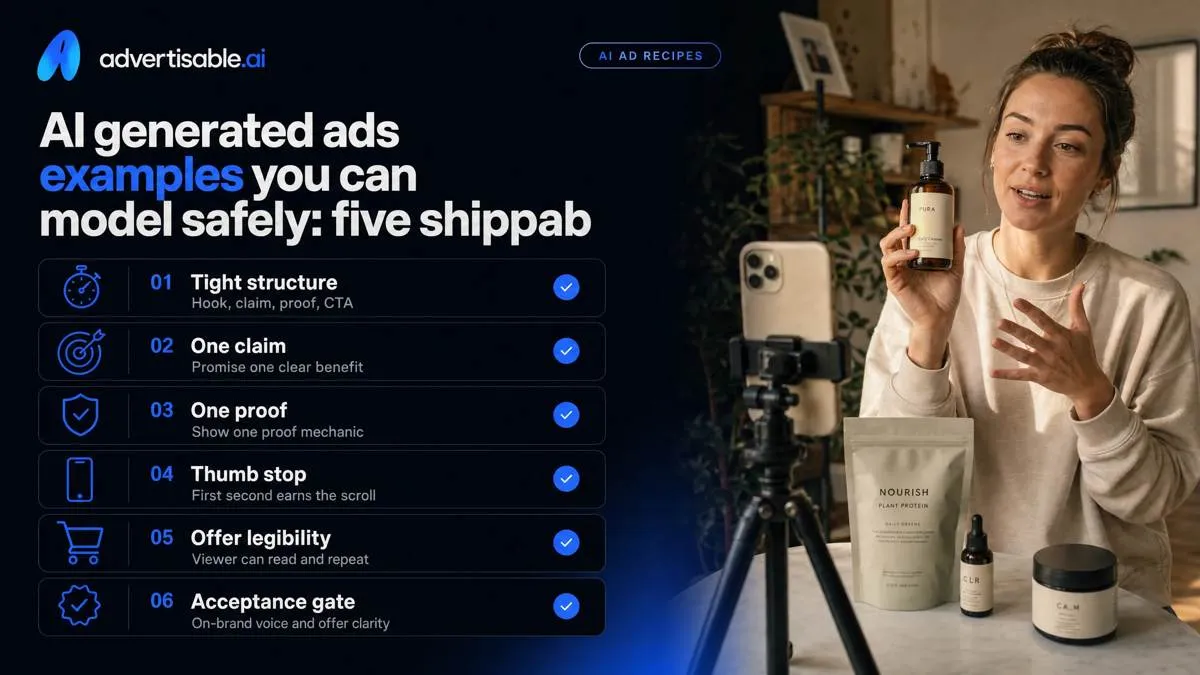
These are 6 to 12 second recipes you can ship without the generic AI look: tight structure, one claim, one proof mechanic, one CTA. They map cleanly to Meta and TikTok where thumb stop and offer legibility matter more than cinematic polish. Your acceptance gate is simple: on-brand voice (no brand drift) and an offer a viewer can read and repeat back after one watch.
Problem aware proof demo
This format ships when you show the pain in the first second, then immediately demonstrate a mechanic that proves the product works. Keep it 8 seconds: Hook (0 to 1s), Proof (1 to 6s), CTA (6 to 8s).
Storyboard: open on the failure state, not your logo. Cut to a single, repeatable proof action the viewer can visually verify (a timer, a one-step transformation, a close-up of the mechanism doing the work). Avoid adjectives like “powerful” and “premium”; they read generic and trigger claim risk without adding belief.
Claim check: the on-screen text should match what your product page can substantiate. The most common failure mode is inventing a benefit in the hook that the proof never actually shows.
Scene-level regen: regenerate the hook scene only. Keep proof and CTA locked so you can attribute CTR movement to the first second, not a full re-render that changes everything.
- Hook (0 to 1s): “Still dealing with X?” paired with the exact pain visual
- Proof (1 to 6s): one physical demo with a timer or side-by-side indicator
- CTA (6 to 8s): one next step only (Shop now OR Get the guide OR See pricing)
Before-after with constraint
This format works when the baseline is specific and the comparison is constrained so viewers trust it. Run it at 10 to 12 seconds max: Baseline (0 to 2s), Timed before/after (2 to 9s), CTA (9 to 12s).
Proof rule: same camera, same framing, same lighting, fixed timer. Your proof is pacing and sameness, not a “better” looking after shot.
Disclaimer: use plain language like “Results vary by use and conditions” when outcomes can depend on user behavior or context.
Failure mode: the comparison drags, so the viewer never reaches the offer. Regenerate only the proof scene pacing (cut length, timer speed, beat timing) instead of restarting the full ad.
- Hook baseline: name the starting condition (“Day 1: X problem at Y time”)
- Timed proof: 2 to 3 beats, each under 2 seconds, with an on-screen timer
- Disclaimer line: “Results vary by use and conditions.”
Objection handler with receipts
You ship this when you call out the skepticism directly, then answer with policy-safe substantiation that does not overclaim. Keep it 6 to 9 seconds: Objection (0 to 2s), Receipt (2 to 6s), Trial CTA (6 to 9s).
Receipts that stay shippable: product specs pulled from your own listing, packaging callouts, warranty terms, clear pricing, or a screenshot of what the customer actually gets (features, inclusions, steps). Avoid medical, financial, or absolute outcome claims unless you can substantiate them cleanly and consistently.
CTA should be low-friction: a $5 trial offer works when it is the only ask and the terms are legible.
Failure mode: the CTA is vague (“learn more”) or crowded with multiple offers. Regenerate the CTA copy for clarity and legibility, not the visuals, so you preserve the proof timing you already validated.
- Hook: “Sounds like another too-good-to-be-true ad?”
- Receipt: show the exact deliverable (what’s included) or a verifiable spec list
- CTA: “Start the $5 trial” (one action, one offer)
How do you keep AI ads from looking generic without slowing production?
Brand DNA guardrails
Generic happens when the model fills gaps with defaults. You prevent sameness by locking Brand DNA once, then forcing every variation to comply with it.
Treat guardrails as acceptance criteria for “shippable,” not creative preference. When they are explicit, QA becomes fast and drift gets caught before it hits approvals.
- Voice rules: 5-10 “always sound like us” notes plus a banned phrase list (especially hypey openers and vague superlatives).
- Visual rules: palette, typography, framing, pacing, and what “clean” vs “busy” looks like in your feed placements.
- Product truth: allowed claims, disallowed claims, required specs, and hard constraints (what it is, what it is not, who it is for).
- Disclaimers inventory: the exact lines you must include by claim type, offer type, or category.
Single-variable variation batches
Speed comes from attributable testing. Hold proof and CTA constant, and swap only the hook angle so CTR movement means something.
Name the learning objective before you generate: “Does price transparency beat mechanism?” or “Does pain-point specificity beat broad benefit?” Run a 48 to 72 hour readout, then decide: promote, iterate, or kill.
- Locked beats: same proof scene and same CTA scene across the batch.
- Variable: hook angle only (problem, outcome, mechanism, objection, comparison).
- Batch label includes objective + date so results survive handoffs.
- Readout window: 48-72 hours in the same placement mix.
Scene-level regeneration rules
Regenerate the weakest scene only. Full narrative resets waste approved work and create new failure modes you now have to re-QA.
Preserve approved scenes (often proof and product showcase) and re-spin only the segment that missed the goal. This cuts approval fatigue because reviewers are not re-litigating the entire ad every cycle.
- Identify the weakest scene by objective (low thumb stop, unclear proof, muddy CTA).
- Regenerate that scene in-place, keeping timing and surrounding context stable.
- Do not touch scenes already approved for brand, claims, and visuals.
- Ship the smallest possible delta so stakeholders review faster.
Claims and disclosure QA for AI ads in 2026: what to check before you publish
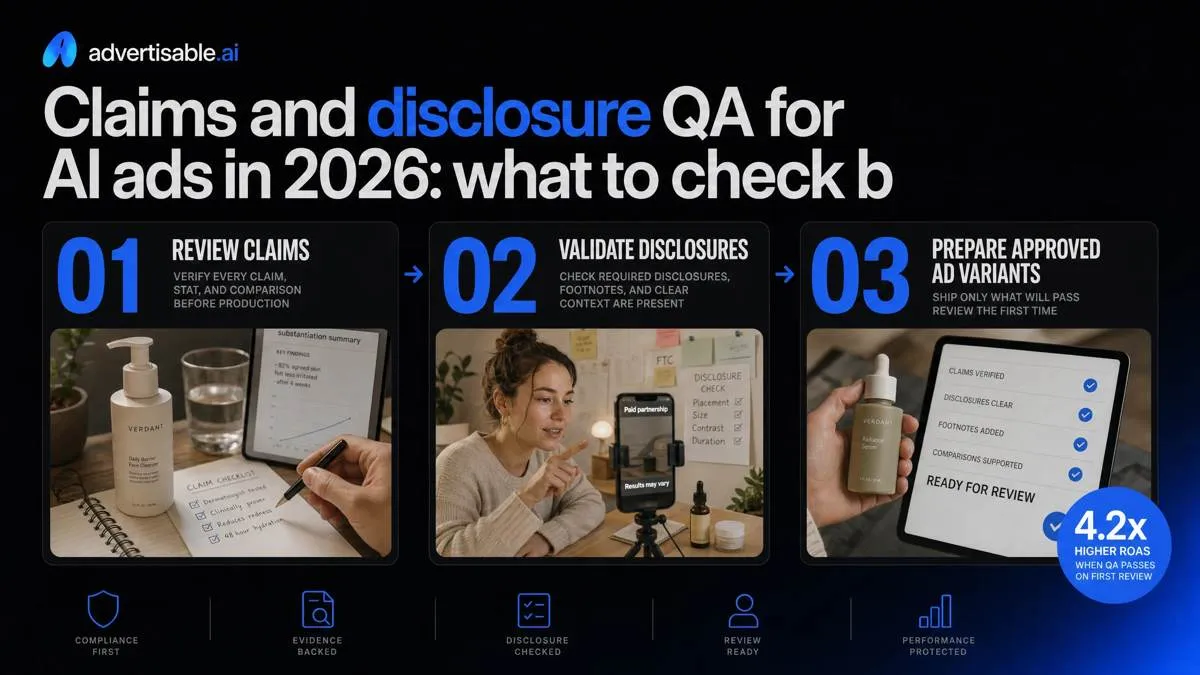
Your biggest operational risk is not creative fatigue. It is shipping an AI variant that fails claims review, gets rejected, or forces a landing page rewrite mid-flight.
FTC ad claim substantiation
Treat every objective claim as a mini contract: if you say it, you can prove it. “Improves results,” “reduces time,” and “#1” are all objective once a reasonable buyer reads them as measurable.
Before-after proof needs conditions. You document the starting state, the timeframe, what changed, and what the viewer must also do for the result to be representative.
Avoid unqualified superlatives unless your evidence supports the strongest version of the claim. If your proof only supports “can help,” do not ship “best” or “guaranteed.”
- Claim log: exact on-screen text, VO line, caption line, and landing page headline it relies on
- Support type per claim: test results, customer data summary, lab report, policy, or controlled demonstration
- Boundaries: who it applies to, duration, typical vs. exceptional outcome
- Owner and timestamp: who approved it and when the evidence was last refreshed
Platform policy failure modes
Most rejections come from “misleading” triggers: implied outcomes, missing context, or a mismatch between ad promise and page reality. Misrepresentation is one of the most serious issues and a leading cause of suspensions in common platform policy failures.
Health and finance categories get less benefit of the doubt. You keep claims narrower, add qualifiers that match your proof, and avoid implying personal attributes or guaranteed outcomes.
Edited media labeling is the other quiet failure mode. If your ad uses synthetic or modified human performance, you check disclosure requirements for the markets you target, including New York's 2026 disclosure law (effective June 9, 2026).
- Landing page matches: same offer, same price, same claim wording, same disclaimers
- No “results” claims that are actually aspirational copy without support
- Disclosure readiness for synthetic or modified performers and voices
- Creative and page do not contradict each other on timing, eligibility, or limitations
Shippable QA checklist
We define “shippable” as: every claim maps to proof, disclaimers are readable on mobile, audio matches captions, and exports match placement specs. This is where cost per shippable variation becomes real, not theoretical.
Run this gate on the storyboard before you generate 5 variants, then rerun after scene-level changes. In Advertisable AI Studio, this is exactly why we keep a QA module in the flow: you want a repeatable pass-fail outcome, not debates in comments.
- Claim to proof mapping: each claim points to a specific internal doc or dataset, not “marketing knowledge”
- Disclaimer legibility: readable at 9:16 on a phone at arm’s length, high contrast, and on-screen long enough to be noticed
- Audio and captions alignment: numbers, dates, pricing, and qualifiers match word-for-word
- Export specs per placement: correct aspect ratio, safe zones, caption burn-in rules, and file format for Meta, TikTok, and YouTube
How to generate five shippable variations with Advertisable AI Studio in one cycle
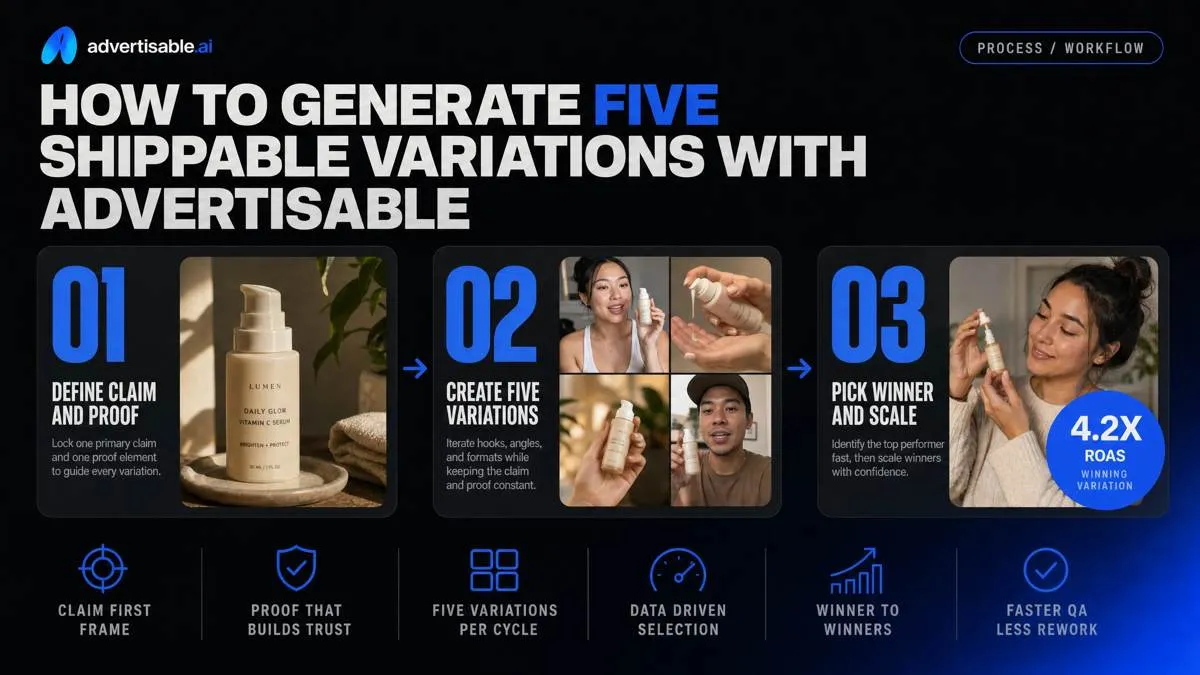
Rework usually comes from two places: unclear claims and unstable proof. For the fastest approvals, ship one primary claim paired with one proof element, then iterate around it.
When video is blocked by stakeholders or timing, use Advertisable AI Static Ads as the fallback: same guardrails, tighter surface area for QA, faster to approve.
URL to Brand DNA
Start by pasting the product URL into Advertisable AI Studio. The goal is to turn your page into a single source of truth so reviews stop happening in scattered docs and DMs.
From that URL, you get auto-extracted product facts and brand guardrails you can hold constant across variations. Capture your allowed claims and required disclaimers up front so your first batch is reviewable, not “promising but risky.”
- Paste product URL to ingest on-page facts, assets, and positioning
- Confirm guardrails: voice, visual rules, no-go terms, required on-screen text
- Approve a single claim and capture the matching disclaimer language
- Invite stakeholders to review and comment in one place before generation
Lock storyboard, then generate
Make the structure non-negotiable before you generate: Hook, Proof, CTA. You are buying predictability, not surprise.
Generate five hook variations only, keeping the proof scene constant. This gives you attributable CTR movement without creative drift, and it keeps approvals tight because reviewers are re-evaluating one scene, not a new ad each time.
- Lock Hook-Proof-CTA beats in the storyboard editor
- Hold proof visuals and wording constant across the batch
- Generate 5 hook scene variations as your single variable
- Name the batch so performance readouts survive handoffs
Regenerate weak scenes, export formats
Don’t restart the whole video when one moment is weak. Regenerate at the scene level, typically the hook, until it meets your acceptance criteria.
Run the QA module before you export so claims, disclaimers, and product truth get checked once per variant, not after files are cut for every channel.
- Scene-level regen: swap only the hook scene that fails thumb-stop or clarity
- QA pass: claims match Brand DNA, disclaimers present, no misleading phrasing
- Export platform sizes: 9:16 and 1:1 from the same approved storyboard
- Export 16:9 for YouTube without rebuilding the creative
Ship one ad first, then scale the batch
You do not need more renders. You need one shippable version you can publish without rework, then a repeatable loop that keeps Brand DNA, claims, and formats under control.
If you want to operationalize what you just read, run one cycle in Advertisable AI Studio. Upload a product URL to extract Brand DNA guardrails, lock a storyboard, then generate five paid-social video variations where you hold three beats constant and change one variable. Use scene-level regeneration to fix only the weak hook or proof scene instead of restarting the whole ad.
Then run the QA module for claim accuracy and disclosure checks, and export a shippable version in 9:16 and 1:1.
If you need faster approval cycles first, start with Advertisable AI Static Ads using the same Brand DNA controls, then graduate the winner to video.
Frequently Asked Questions
Why do AI-generated ads look the same as each other?
Because most generators converge on the same default pacing, lighting, and generic hook and proof patterns. You get differentiation when you lock Brand DNA guardrails and force single-variable changes at the scene level so each iteration stays specific and attributable.
What is the difference between cost per variation and cost per shippable variation?
Cost per variation counts everything you generate, including outputs that fail brand, claims, or format checks. Cost per shippable variation counts only what clears QA and can be published in your required sizes, which is the number that reflects real throughput and rework.
How is scene-level regeneration different from full video regeneration?
Full regeneration resets the entire ad, which increases drift and restarts approvals. Scene-level regeneration lets you swap only the hook, proof, or CTA scene while holding the rest constant, so you learn faster and protect what already passed QA.